Every major platform, whether it is an app on a phone or an mission critical service running in-house or a SAAS service running in the cloud configured to use authentication from an external source. OpenShift is no exception - in my lab, I got it setup with FreeIPA (a LDAP service), which I would like to demonstrate in this post.
Previously. . .
When I setup my OpenShift cluster, I configure a basic form of authentication using them htpasswd provider. It involves:
- Creating a htpasswd file
- Storing the htpasswd in a secret.
- Referencing the secret in the HTPasswd provider.
It looks like this:
apiVersion: config.openshift.io/v1
kind: OAuth
metadata:
  name: cluster
spec:
  identityProviders:
  - name: htpasswd_provider
    challenge: true
    login: true
    mappingMethod: claim
    type: HTPasswd
    htpasswd:
      fileData:
        name: htpass-secret
This will work for simple small setups as well as break-glass access. For larger implementation, this will not scale, so I will configure OpenShift to authenticate with an existing FreeIPA service I have running in my environment.
Creating LDAP Users
Now, setting up FreeIPA goes beyond this walkthrough, so I will simply point to this site for instructions.
The important thing for our purposes is once you are done, create the following:
- Your user (in my case, rilindofoster)
- A user to be used for a service account:

Both users are part of the ipausers group. I then created a group call okdadmins and added my user to that group:
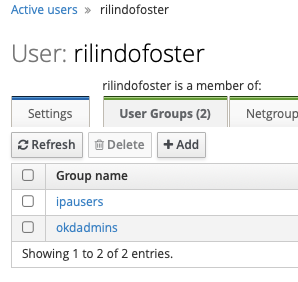
The okdadmins group will let me login as admin, but we are getting ahead of ourselves here.
Setup LDAP Provider
With the users setup, I am ready to create the provider. First, I created a secret ldap-bind-secret, which will contain the sa-bind-account password in openshift-config namespace (or project):
oc create secret generic ldap-bind-secret --from-literal=bindPassword=thisisabindpassword -n openshift-config
Next, I store the FreeIPA certificate authority in a config ma (the CA file is located on the FreeIPA server at /etc/ipa/ca.crt). I copied the file from the FreeIPA to my environment and store the ca.crt file as follows (again, in openshift-config namespace)
oc create cm freeipa-ca --from-file=ca.crt=ca.crt -n openshift-config
Now I am ready to add the provider. I edit oath:
oc edit oauth
And added the following code after my last provider:
 - ldap:
        attributes:
          email:
          - mail
          id:
          - uid
          name:
          - cn
          preferredUsername:
          - uid
        bindDN: uid=sa-bind-account,cn=users,cn=accounts,dc=infra,dc=example,dc=com
        bindPassword:
          name: ldap-bind-secret
        ca:
          name: freeipa-ca
        url: ldaps://ipa.infra.example.com/cn=users,cn=accounts,dc=infra,dc=example,dc=com?uid
      mappingMethod: claim
      name: freeipa-ldap
      type: LDAP
The documentation has a fairly reasonably documented example here, so all you would need to populate are:
bindDN- the path to your service accountbindPassword- the secret that contains your ldap bind passwordca- the config map that contains the ca certificate.url- the query URL used to lookup the user.name- what you would call your provider.
With my existing htpasswd provider setup prior to it, it looks like this:
apiVersion: config.openshift.io/v1
kind: OAuth
metadata:
  name: cluster
spec:
  identityProviders:
  - name: htpasswd_provider
    challenge: true
    login: true
    mappingMethod: claim
    type: HTPasswd
    htpasswd:
      fileData:
        name: htpass-secret
    - ldap:
        attributes:
          email:
          - mail
          id:
          - uid
          name:
          - cn
          preferredUsername:
          - uid
        bindDN: uid=sa-bind-account,cn=users,cn=accounts,dc=infra,dc=example,dc=com
        bindPassword:
          name: ldap-bind-secret
        ca:
          name: freeipa-ca
        url: ldaps://ipa.infra.example.com/cn=users,cn=accounts,dc=infra,dc=example,dc=com?uid
      mappingMethod: claim
      name: freeipa-ldap
      type: LDAP
I then saved it and wait a few minutes. You can watch the pods being relaunched here:
oc get pods -n openshift-authentication
If you don't see the pods replaced, that means there is a problem with the setup, likely either your secret or your ca. You may need to double that those are created properly on top of the attributes setup in your LDAP provider yaml.
Setup LDAP Group Sync
With the authentication setup, I should be able to authenticate now. But I am not done - we need to be able to assign users to groups and then assign the appropriate permissions to those groups. So I will replicate the groups from ldap.
First, I create a new project / namespace to run the sync:
oc new-project auth-freeipa-sync
Next I create a service account user freeipa-group-syncer:
oc create sa freeipa-group-syncer
Then I create a cluster role freeipa-group-syncer with the permissions to create the group:
oc create clusterrole freeipa-group-syncer --verb get,list,create,update --resource groups
And then I assign that cluster group to the service account:
oc adm policy add-cluster-role-to-user freeipa-group-syncer -z freeipa-group-syncer
I then add secret freeipa-secret that contains sa-bind-account password:
oc create secret generic freeipa-secret --from-literal bindPassword='thisisabindpassword'
At this point, I create an LDAP Sync file:
vi freeipa-sync.yaml
(Side note: Funny how I keep defaulting to vi even though I have VSCode on my machine. Some habits are hard to break)
I create LDAPSyncConfig object that will be used to replicate the group.
kind: LDAPSyncConfig
apiVersion: v1
url: ldaps://ipa.infra.example.com:636
bindDN: 'uid=sa-bind-account,cn=users,cn=accounts,dc=infra,dc=example,dc=com'
bindPassword:
  file: /etc/secrets/bindPassword
ca: /etc/config/ca.crt
augmentedActiveDirectory:
    groupsQuery:
        baseDN: "cn=groups,cn=accounts,dc=infra,dc=example,dc=com"
        scope: sub
        derefAliases: never
    groupUIDAttribute: dn
    groupNameAttributes: [ cn ]
    groupMembershipAttributes: [ member ]
    usersQuery:
        baseDN: "cn=users,cn=accounts,dc=infra,dc=example,dc=com"
        scope: sub
        derefAliases: never
        filter: (objectclass=*)
    userNameAttributes: [ mail ]
    userUIDAttribute: dn
    tolerateMemberNotFoundErrors: true
    tolerateMemberOutOfScopeErrors: true
This took a few hours and some consultation with Google and ChatGPT to figure things out. In short, you need to use augementedActiveDirectory attribute and you need to add tolerateMemberNotFoundErrors and tolerateMemberOutofScopeErrors to get it working. For the last two, you should think carefully before adding those if you are working in a production environment.
With that done, I plugging the freeipa-sync.yaml as well as the certificate authority file in their respective config maps:
oc create cm freeipa-config --from-file freeipa-sync.yaml=freeipa-sync.yaml,ca.crt=ca.crt
Finally, I setup a CronJob to run the sync every minute:
apiVersion: batch/v1
kind: CronJob
metadata:
  name: freeipa-group-sync
  namespace: auth-freeipa-sync
spec:
  schedule: "*/1 * * * *"
  jobTemplate:
    spec:
      template:
        spec:
          restartPolicy: Never
          containers:
            - name: ldap-group-sync
              image: "quay.io/openshift-pipeline/openshift4-ose-cli"
              command:
                - "/bin/sh"
                - "-c"
                - "oc adm groups sync --sync-config=/etc/config/freeipa-sync.yaml --confirm"
              volumeMounts:
                - mountPath: "/etc/config"
                  name: "ldap-sync-volume"
                - mountPath: "/etc/secrets"
                  name: "ldap-bind-password"
          volumes:
            - name: "ldap-sync-volume"
              configMap:
                name: "freeipa-config"
            - name: "ldap-bind-password"
              secret:
                secretName: "freeipa-secret"
          serviceAccountName: freeipa-group-syncer
          serviceAccount: freeipa-group-syncer”
Very important: You would need to use the Openshift OSE CLI, which you can get from quay.io/openshift-pipeline/openshift4-ose-cli.
After a minute or so, I see the group replicated with the user when I run oc get groups:
➜  home_lab git:(master) ✗ oc get groups
NAME           USERS
admins         admin
audit3
audit4
auditone
audittwo
ipausers       sa-bind-account, rilindofoster
okd_admins     rilindo
okdadmins      rilindofoster
readonlyone
trust admins   admin
➜  home_lab git:(master) ✗
Logging in
Now I am ready to get login. I went to the OpenShift console and I see a button freeipa-ldap to authenticate with LDAP:
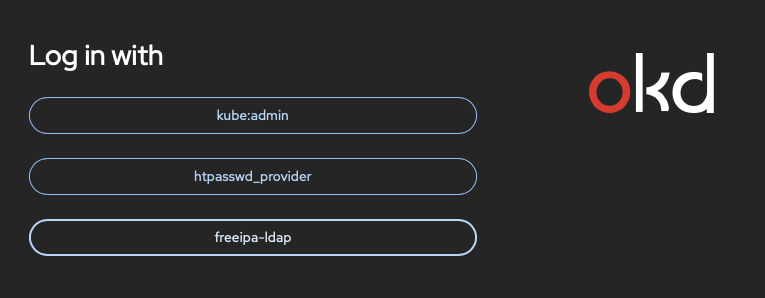
I click on that button and enter my credentials:
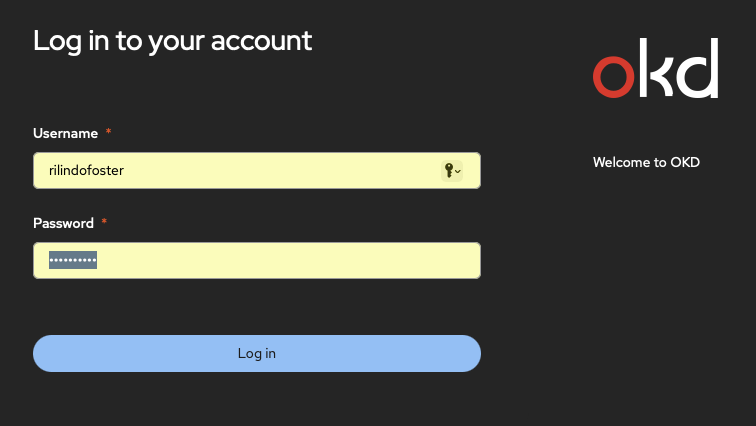
And I am in:
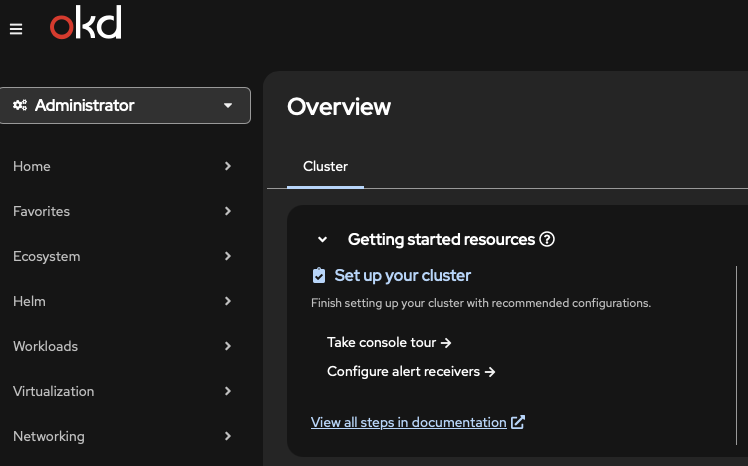
Of course, I can also login via the CLI, but instead of passing my credentials, I just login with:
oc login --web
Which will let me with the browser. Once that is done, I get the following in the browser:
access token received successfully; please return to your terminal
It returns me to the terminal.
➜  home_lab git:(master) ✗ oc login --web
Opening login URL in the default browser: https://oauth-openshift.apps.okd.example.com/oauth/authorize?client_id=openshift-cli-client&code_challenge=<REDACTED>&code_challenge_method=S256&redirect_uri=http%3A%2F%2F127.0.0.1%3A55082%2Fcallback&response_type=code
Login successful.

You have access to 96 projects, the list has been suppressed. You can list all projects with 'oc projects'

Using project "apache2".
➜  home_lab git:(master) ✗
I hope you find this useful.
Update: 2025-12-02
Seems that something changed when I upgrade to version 4.20.10, as I was no longer able to sync. After a bit of searching and test, this seems to be a working configuration:
kind: LDAPSyncConfig
apiVersion: v1
url: ldaps://ipa.infra.monzell.com:636
bindDN: 'uid=sa-bind-account,cn=users,cn=accounts,dc=infra,dc=monzell,dc=com'
bindPassword:
  file: /etc/secrets/bindPassword
ca: /etc/config/ca.crt
rfc2307:
    groupsQuery:
        baseDN: "cn=groups,cn=accounts,dc=infra,dc=monzell,dc=com"
        scope: sub
        derefAliases: never
        pageSize: 0
        filter: (objectclass=*)
    groupUIDAttribute: dn
    groupNameAttributes: [ cn ]
    groupMembershipAttributes: [ member ]
    usersQuery:
        baseDN: "cn=users,cn=accounts,dc=infra,dc=monzell,dc=com"
        scope: sub
        derefAliases: never
        pageSize: 0
    userNameAttributes: [ uid ]
    userUIDAttribute: dn
    tolerateMemberNotFoundErrors: false
    tolerateMemberOutOfScopeErrors: false