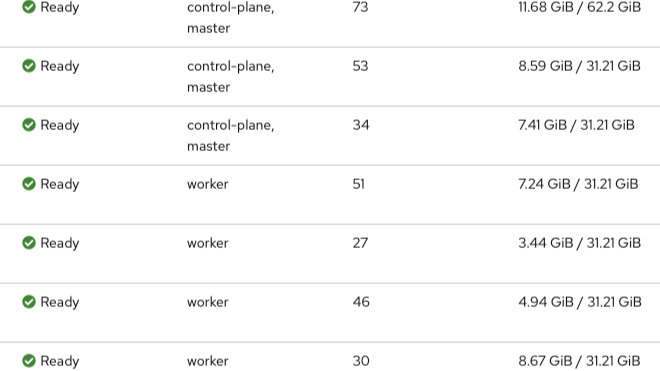
Previously, in my last post, I demonstrated how I setup my OpenShift Cluster using the assisted installer. At the time, I had intended to use the Assisted Service installer to add a new node, because one of my workers nodes is unstable. In fact, I configured it so that the storage is present, which should let me start up the pod with the data still present. But when I started my Assisted Service, lo and behold, my cluster is gone.
That was not what I expected.
So I looked for another way to add a node to cluster. And it turns out, it was easy.
Prep Work
First thing is to make sure that the node has its own forward and reverse DNS entries. So, I added worker03.node.example.com with the IP of 172.16.3.223 to my forward zone:
$TTL 300
;
$ORIGIN example.com.

;   Database file example.com.DB for example.com zone.
;   Do not edit this file!!!
;   Zone version 2757946178
;
example.com.     IN  SOA 127.0.0.1.      my.localhost. (
        2757946178 ; serial
        1d ; refresh
        2h ; retry
        4w ; expire
        1h ; default_ttl
        )

;
; Zone Records
;
@    IN NS  127.0.0.1.
@    IN A   172.16.3.5
ns1      IN A   172.16.3.5
control00.node   IN A   172.16.3.210
control01.node   IN A   172.16.3.211
control02.node   IN A   172.16.3.212
worker00.node    IN A   172.16.3.220
worker01.node    IN A   172.16.3.221
apps.okd     IN A   172.16.3.5
*.apps.okd   IN A   172.16.3.5
api.okd      IN A   172.16.3.5
api-int      IN A   172.16.3.5
worker02.node    IN A   172.16.3.222
ipa.infra    IN A   172.16.1.13
worker03.node    IN A   172.16.3.223
And I added .223 to my reverse zone:
$TTL 84600
;
$ORIGIN 3.16.172.in-addr.arpa.

;   Database file 3.168.192.DB for 3.168.192 zone.
;   Do not edit this file!!!
;   Zone version 2757967879
;
@    IN  SOA 127.0.0.1.      my.email.com. (
        2757967879 ; serial
        1d ; refresh
        2h ; retry
        4w ; expire
        1h ; default_ttl
        )

;
; Zone Records
;
     IN NS  127.0.0.1.
210      IN PTR     control00.node.example.com.
211      IN PTR     control01.node.example.com.
212      IN PTR     control02.node.example.com.
220      IN PTR     worker00.node.example.com.
221      IN PTR     worker01.node.example.com.
222      IN PTR     worker02.node.example.com.
223      IN PTR     worker03.node.example.com.
I updated my HA Proxy configurations:
# cat haproxy.cfg
# Automaticaly generated, dont edit manually.
# Generated on: 2025-09-17 02:06
global
    maxconn         10000
    stats socket /tmp/haproxy.socket level admin  expose-fd listeners
    uid         80
    gid         80
    nbthread            1
    hard-stop-after     15m
    chroot              /tmp/haproxy_chroot
    daemon
    server-state-file /tmp/haproxy_server_state

listen HAProxyLocalStats
    bind 127.0.0.1:2200 name localstats
    mode http
    stats enable
    stats admin if TRUE
    stats show-legends
    stats uri /haproxy/haproxy_stats.php?haproxystats=1
    timeout client 5000
    timeout connect 5000
    timeout server 5000

frontend lb01.example.com
    bind            172.16.1.5:6443 name 172.16.1.5:6443
    mode            tcp
    log         global
    timeout client      30000
    default_backend okd-api_ipvANY

frontend lb02.example.com
    bind            172.16.1.5:80 name 172.16.1.5:80
    mode            tcp
    log         global
    timeout client      30000
    default_backend okd-http_ipvANY

frontend lb03.example.com
    bind            172.16.1.5:443 name 172.16.1.5:443
    mode            tcp
    log         global
    timeout client      30000
    default_backend okd-https_ipvANY

backend okd-api_ipvANY
    mode            tcp
    id          100
    log         global
    timeout connect     30000
    timeout server      30000
    retries         3
    load-server-state-from-file global
    server          control00 172.16.1.210:6443 id 101 check inter 1000
    server          control01 172.16.1.211:6443 id 103 check inter 1000
    server          control02 172.16.1.212:6443 id 113 check inter 1000
    server          worker00 172.16.1.220:6443 id 102 check inter 1000
    server          worker01 172.16.1.221:6443 id 106 check inter 1000
    server          worker02 172.16.1.222:6443 id 118 check inter 1000
    server          worker03 172.16.1.223:6443 id 118 check inter 1000


backend okd-http_ipvANY
    mode            tcp
    id          104
    log         global
    timeout connect     30000
    timeout server      30000
    retries         3
    load-server-state-from-file global
    server          control00 172.16.1.210:80 id 105 check inter 1000
    server          control01 172.16.1.211:80 id 107 check inter 1000
    server          control02 172.16.1.212:80 id 115 check inter 1000
    server          worker00 172.16.1.220:80 id 110 check inter 1000
    server          worker01 172.16.1.221:80 id 112 check inter 1000
    server          worker02 172.16.1.222:80 id 119 check inter 1000
    server          worker03 172.16.1.222:80 id 119 check inter 1000


backend okd-https_ipvANY
    mode            tcp
    id          108
    log         global
    timeout connect     30000
    timeout server      30000
    retries         3
    load-server-state-from-file global
    server          control00 172.16.1.210:443 id 109 check inter 1000
    server          control01 172.16.1.211:443 id 111 check inter 1000
    server          control02 172.16.1.212:443 id 117 check inter 1000
    server          worker00 172.16.1.220:443 id 114 check inter 1000
    server          worker01 172.16.1.221:443 id 116 check inter 1000
    server          worker02 172.16.1.222:443 id 120 check inter 1000
    server          worker03 172.16.1.222:443 id 120 check inter 1000
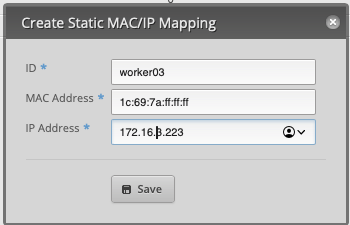
And finally, I configure my DNS server so that it will assign the IP to that new node based on MAC address:
Now I am ready.
Segue: Imperative Vs Declarative
When engineers working with Kubernetes talk about running operations imperatively or declaratively, they really mean either:
- Creating, managing, and deleting Kubernetes resources via the command line - imperative approach
- Creating, managing, and deleting Kubernetes resources via code - declarative approach.
With an imperative approach, you perform operations via the command line. Here is a command to launch an Apache deployment:
➜  oc create deploy apache2-imperative --image=quay.io/sclorg/httpd-24-micro-c9s
deployment.apps/apache2-imperative created
➜  oc get pods
NAME                                  READY   STATUS    RESTARTS   AGE
apache2-imperative-855c84b4b4-gw2z5   1/1     Running   0          3s
With a declarative approach, you would create and update YAML code (or JSON) to perform operations:
➜  cat declarative.yaml
apiVersion: apps/v1
kind: Deployment
metadata:
  creationTimestamp: null
  labels:
    app: apache2-declarative-yaml
  name: apache2-declarative-yaml
spec:
  replicas: 1
  selector:
    matchLabels:
      app: apache2-declarative-yaml
  strategy: {}
  template:
    metadata:
      creationTimestamp: null
      labels:
        app: apache2-declarative-yaml
    spec:
      containers:
      - image: quay.io/sclorg/httpd-24-micro-c9s
        name: httpd-24-micro-c9s
        resources: {}
status: {}
Either approach is perfectly acceptable, especially since you can easily export an imperative command into YAML and then execute the operation:
➜  oc create deploy apache2-declarative-yaml --image=quay.io/sclorg/httpd-24-micro-c9s --dry-run=client -o yaml > declarative.yaml
➜  oc get pods
NAME                                  READY   STATUS    RESTARTS   AGE
apache2-imperative-855c84b4b4-gw2z5   1/1     Running   0          65s
➜  oc create -f declarative.yaml
deployment.apps/apache2-declarative-yaml created
➜  oc get pods
NAME                                        READY   STATUS    RESTARTS   AGE
apache2-declarative-yaml-7c4d4c9ffd-9mtbk   1/1     Running   0          2s
apache2-imperative-855c84b4b4-gw2z5         1/1     Running   0          98s
The file itself can called anything and ends with any extension as long as the code itself is in YAML.
➜  oc create deploy apache2-declarative-txt --image=quay.io/sclorg/httpd-24-micro-c9s --dry-run=client -o yaml > declarative.txt
➜  oc create -f declarative.txt
deployment.apps/apache2-declarative-txt created
➜  oc get pods
NAME                                        READY   STATUS    RESTARTS   AGE
apache2-declarative-txt-65fd959745-p5dln    1/1     Running   0          4s
apache2-declarative-yaml-7c4d4c9ffd-9mtbk   1/1     Running   0          36s
apache2-imperative-855c84b4b4-gw2z5         1/1     Running   0          2m12s
Usually. We'll come back to that.
Building and Booting the New Node: Imperative Approach
To setup a new node, I created a new ISO for the worker like this:
oc adm node-image create -m='1c:69:7a:ff:ff:ff' --hostname='worker03.node.example.com' --root-device-hint=deviceName:/dev/nvme0n1
Now, my intention was to create an ignition file in YAML like this:
hosts:
- hostname: worker03.node.example.com
  rootDeviceHints:
   deviceName: /dev/nvme0n1
  interfaces:
   - macAddress: 1c:69:7a:ff:ff:ff
     name: eno1
  networkConfig:
   interfaces:
     - name: eno1
       type: ethernet
       state: up
       mac-address: 1c:69:7a:ff:ff:ff
       ipv4:
         enabled: true
         dhcp: true
And run with the same command:
oc adm node-image create nodes-config.yml
But oc command complained it could not find that. At all. Even when I had that file in the same directory path.
So I gave up for now.
Anyway, with the imperative approach, when I executed the command, its starts downloading and creating the image:
pullspec obtained from installer-images configMap quay.io/okd/scos-content@sha256:51b2b536182a07c87f942ad0c93cf4bf6bd4f163c75da2c61e917ed4e9b16a06
2025-10-24T22:06:57Z [node-image create] Launching command
2025-10-24T22:07:33Z [node-image create] Gathering additional information from the target cluster
2025-10-24T22:07:33Z [node-image create] Creating internal configuration manifests
2025-10-24T22:07:33Z [node-image create] Rendering ISO ignition
2025-10-24T22:07:33Z [node-image create] Retrieving the base ISO image
2025-10-24T22:07:33Z [node-image create]   Extracting base image from release payload
2025-10-24T22:08:13Z [node-image create]   Verifying base image version
2025-10-24T22:08:48Z [node-image create] Creating agent artifacts for the final image
2025-10-24T22:08:48Z [node-image create]   Extracting required artifacts from release payload
2025-10-24T22:08:58Z [node-image create]   Preparing artifacts
2025-10-24T22:08:58Z [node-image create] Assembling ISO image
2025-10-24T22:08:58Z [node-image create] Saving ISO image to /Users/rilindo/tmp
2025-10-24T22:10:30Z [node-image create] Command successfully completed
Once that is done, I wrote the image into a USB stick, boot the new node and while that is boot, I monitored the progress with:
oc adm node-image monitor --ip-addresses=172.16.3.223
This is what gets returns:
➜  oc adm node-image monitor --ip-addresses=172.16.3.223
2025-10-24T22:24:53Z [node-image monitor] installer pullspec obtained from installer-images configMap quay.io/okd/scos-content@sha256:51b2b536182a07c87f942ad0c93cf4bf6bd4f163c75da2c61e917ed4e9b16a06
2025-10-24T22:24:53Z [node-image monitor] Launching command
2025-10-24T22:24:58Z [node-image monitor] Monitoring IPs: [172.16.3.223]
2025-10-24T22:24:59Z [node-image monitor] Node 172.16.3.223: Node 172.16.3.223: Cluster is adding hosts
2025-10-24T22:24:59Z [node-image monitor] Node 172.16.3.223: Host worker03.node.example.com validation: Missing ignition information
2025-10-24T22:24:59Z [node-image monitor] Node 172.16.3.223: Host worker03.node.example.com validation: Ignition is not yet available, pending API connectivity
2025-10-24T22:24:59Z [node-image monitor] Node 172.16.3.223: Host worker03.node.example.com validation: DNS validation for the api.okd.example.com domain cannot be completed at the moment. This could be due to other validations
2025-10-24T22:24:59Z [node-image monitor] Node 172.16.3.223: Host worker03.node.example.com validation: DNS validation for the api-int.okd.example.com domain cannot be completed at the moment. This could be due to other validations
2025-10-24T22:24:59Z [node-image monitor] Node 172.16.3.223: Host worker03.node.example.com validation: DNS validation for the *.apps.okd.example.com domain cannot be completed at the moment. This could be due to other validations
2025-10-24T22:24:59Z [node-image monitor] Node 172.16.3.223: Host worker03.node.example.com: updated status from discovering to insufficient (Host does not meet the minimum hardware requirements: )
2025-10-24T22:25:24Z [node-image monitor] Node 172.16.3.223: Host worker03.node.example.com: updated status from insufficient to known (Host is ready to be installed)
2025-10-24T22:25:29Z [node-image monitor] Node 172.16.3.223: Host worker03.node.example.com: updated status from known to installing (Installation is in progress)
2025-10-24T22:25:59Z [node-image monitor] Monitoring IPs: [172.16.3.223]
2025-10-24T22:25:59Z [node-image monitor] Node 172.16.3.223: Node 172.16.3.223: Cluster is adding hosts
2025-10-24T22:25:59Z [node-image monitor] Node 172.16.3.223: Host worker03.node.example.com validation: Missing ignition information
2025-10-24T22:25:59Z [node-image monitor] Node 172.16.3.223: Host worker03.node.example.com validation: Ignition is not yet available, pending API connectivity
2025-10-24T22:25:59Z [node-image monitor] Node 172.16.3.223: Host worker03.node.example.com validation: DNS validation for the api.okd.example.com domain cannot be completed at the moment. This could be due to other validations
2025-10-24T22:25:59Z [node-image monitor] Node 172.16.3.223: Host worker03.node.example.com validation: DNS validation for the api-int.okd.example.com domain cannot be completed at the moment. This could be due to other validations
2025-10-24T22:25:59Z [node-image monitor] Node 172.16.3.223: Host worker03.node.example.com validation: DNS validation for the *.apps.okd.example.com domain cannot be completed at the moment. This could be due to other validations
2025-10-24T22:25:59Z [node-image monitor] Node 172.16.3.223: Host worker03.node.example.com: updated status from discovering to insufficient (Host does not meet the minimum hardware requirements: )
2025-10-24T22:25:59Z [node-image monitor] Node 172.16.3.223: Host worker03.node.example.com: updated status from insufficient to known (Host is ready to be installed)
2025-10-24T22:25:59Z [node-image monitor] Node 172.16.3.223: Host worker03.node.example.com: updated status from known to installing (Installation is in progress)
2025-10-24T22:26:24Z [node-image monitor] Node 172.16.3.223: Host: worker03.node.example.com, reached installation stage Writing image to disk: 5%
2025-10-24T22:26:29Z [node-image monitor] Node 172.16.3.223: Host: worker03.node.example.com, reached installation stage Writing image to disk: 11%
2025-10-24T22:26:34Z [node-image monitor] Node 172.16.3.223: Host: worker03.node.example.com, reached installation stage Writing image to disk: 17%
2025-10-24T22:26:39Z [node-image monitor] Node 172.16.3.223: Host: worker03.node.example.com, reached installation stage Writing image to disk: 22%
2025-10-24T22:26:49Z [node-image monitor] Node 172.16.3.223: Host: worker03.node.example.com, reached installation stage Writing image to disk: 32%
2025-10-24T22:26:54Z [node-image monitor] Node 172.16.3.223: Host: worker03.node.example.com, reached installation stage Writing image to disk: 38%
2025-10-24T22:26:59Z [node-image monitor] Node 172.16.3.223: Host: worker03.node.example.com, reached installation stage Writing image to disk: 49%
2025-10-24T22:27:04Z [node-image monitor] Node 172.16.3.223: Host: worker03.node.example.com, reached installation stage Writing image to disk: 61%
2025-10-24T22:27:09Z [node-image monitor] Node 172.16.3.223: Host: worker03.node.example.com, reached installation stage Writing image to disk: 72%
2025-10-24T22:27:14Z [node-image monitor] Node 172.16.3.223: Host: worker03.node.example.com, reached installation stage Writing image to disk: 79%
2025-10-24T22:27:19Z [node-image monitor] Node 172.16.3.223: Host: worker03.node.example.com, reached installation stage Writing image to disk: 84%
2025-10-24T22:27:24Z [node-image monitor] Node 172.16.3.223: Host: worker03.node.example.com, reached installation stage Writing image to disk: 100%
2025-10-24T22:27:29Z [node-image monitor] Node 172.16.3.223: Host: worker03.node.example.com, reached installation stage Rebooting
Side note: once it tells you that it is rebooting, you should go ahead and unplug the USB. Otherwise, you will get these scary messages below:
012c3090 ID:0xc00110fe34 Kind:0xc0012c30a0 Reason:0xc0012c30b0}
2025-10-24T22:30:05Z [node-image monitor] Node 192.168.3.223: Error fetching status from assisted-service for node 192.168.3.223: Unable to retrieve cluster metadata from Agent Rest API: [GET /v2/clusters/{cluster_id}][404] v2GetClusterNotFound  &{Code:0xc000eb4030 Href:0xc000eb4040 ID:0xc001e0660c Kind:0xc000eb4060 Reason:0xc000eb4070}
2025-10-24T22:30:10Z [node-image monitor] Node 192.168.3.223: Error fetching status from assisted-service for node 192.168.3.223: Unable to retrieve cluster metadata from Agent Rest API: [GET /v2/clusters/{cluster_id}][404] v2GetClusterNotFound  &{Code:0xc0012c38a0 Href:0xc0012c38b0 ID:0xc0012b2b84 Kind:0xc0012c38c0 Reason:0xc0012c38d0}
2025-10-24T22:30:15Z [node-image monitor] Node 192.168.3.223: Error fetching status from assisted-service for node 192.168.3.223: Unable to retrieve cluster metadata from Agent Rest API: [GET /v2/clusters/{cluster_id}][404] v2GetClusterNotFound  &{Code:0xc001320a90 Href:0xc001320aa0 ID:0xc001309524 Kind:0xc001320ab0 Reason:0xc001320ac0}
2025-10-24T22:30:20Z [node-image monitor] Node 192.168.3.223: Error fetching status from assisted-service for node 192.168.3.223: Unable to retrieve cluster metadata from Agent Rest API: [GET /v2/clusters/{cluster_id}][404] v2GetClusterNotFound  &{Code:0xc0013eecb0 Href:0xc0013eecc0 ID:0xc000a37604 Kind:0xc0013eecd0 Reason:0xc0013eece0}
2025-10-24T22:30:25Z [node-image monitor] Node 192.168.3.223: Error fetching status from assisted-service for node 192.168.3.223: Unable to retrieve cluster metadata from Agent Rest API: [GET /v2/clusters/{cluster_id}][404] v2GetClusterNotFound  &{Code:0xc0006f88a0 Href:0xc0006f88b0 ID:0xc001359314 Kind:0xc0006f88c0 Reason:0xc0006f88d0}
2025-10-24T22:30:30Z [node-image monitor] Node 192.168.3.223: Error fetching status from assisted-service for node 192.168.3.223: Unable to retrieve cluster metadata from Agent Rest API: [GET /v2/clusters/{cluster_id}][404] v2GetClusterNotFound  &{Code:0xc000999090 Href:0xc0009990a0 ID:0xc0013440e4 Kind:0xc0009990b0 Reason:0xc0009990c0}
2025-10-24T22:30:35Z [node-image monitor] Node 192.168.3.223: Error fetching status from assisted-service for node 192.168.3.223: Unable to retrieve cluster metadata from Agent Rest API: [GET /v2/clusters/{cluster_id}][404] v2GetClusterNotFound  &{Code:0xc00052d110 Href:0xc00052d120 ID:0xc00137d844 Kind:0xc00052d130 Reason:0xc00052d140}
2025-10-24T22:30:40Z [node-image monitor] Node 192.168.3.223: Error fetching status from assisted-service for node 192.168.3.223: Unable to retrieve cluster metadata from Agent Rest API: [GET /v2/clusters/{cluster_id}][404] v2GetClusterNotFound  &{Code:0xc0013201e0 Href:0xc0013201f0 ID:0xc0012d2144 Kind:0xc001320200 Reason:0xc001320210}
2025-10-24T22:30:45Z [node-image monitor] Node 192.168.3.223: Error fetching status from assisted-service for node 192.168.3.223: Unable to retrieve cluster metadata from Agent Rest API: [GET /v2/clusters/{cluster_id}][404] v2GetClusterNotFound  &{Code:0xc001321870 Href:0xc001321880 ID:0xc001eaaf64 Kind:0xc001321890 Reason:0xc0013218a0}
2025-10-24T22:30:50Z [node-image monitor] Node 192.168.3.223: Error fetching status from assisted-service for node 192.168.3.223: Unable to retrieve cluster metadata from Agent Rest API: [GET /v2/clusters/{cluster_id}][404] v2GetClusterNotFound  &{Code:0xc0012c2cd0 Href:0xc0012c2ce0 ID:0xc000c07ce4 Kind:0xc0012c2cf0 Reason:0xc0012c2d00}
2025-10-24T22:30:55Z [node-image monitor] Node 192.168.3.223: Error fetching status from assisted-service for node 192.168.3.223: Unable to retrieve cluster metadata from Agent Rest API: [GET /v2/clusters/{cluster_id}][404] v2GetClusterNotFound  &{Code:0xc000f042e0 Href:0xc000f04320 ID:0xc000699ea4 Kind:0xc000f04330 Reason:0xc000f04420}
When that happens, just make sure that your USB stick is not connected to your node.
After about 5-10 minutes, the installation is almost be done and start to check in. The node showed up in my node list:
oc get nodes
And the CSR should show up when you run:
oc get csr
OpenShift (really, Kubenetes) are authenticated and authorized via certificates, so you need to need approve the CSRs. So when you see this:
NAME        AGE   SIGNERNAME                            REQUESTOR                                    REQUESTEDDURATION   CONDITION
csr-8kw9q   4s    kubernetes.io/kube-apiserver-client   system:ovn-node:control01.node.example.com   24h                 Approved,Issued
I had to approve it running the oc adm certificate approve command:
oc adm certificate approve csr-8kw9q
This will not be the last time I will be asked to approve the CSRs:
NAME        AGE    SIGNERNAME                                    REQUESTOR                                                                   REQUESTEDDURATION   CONDITION
csr-8kw9q   3m7s   kubernetes.io/kube-apiserver-client           system:ovn-node:control01.node.example.com                                  24h                 Approved,Issued
csr-fnp5n   34s    kubernetes.io/kube-apiserver-client-kubelet   system:serviceaccount:openshift-machine-config-operator:node-bootstrapper   <none>              Pending
So I had to approve each CSR until all of them are approved:
NAME        AGE     SIGNERNAME                                    REQUESTOR                                                                   REQUESTEDDURATION   CONDITION
csr-8kw9q   4m53s   kubernetes.io/kube-apiserver-client           system:ovn-node:control01.node.example.com                                  24h                 Approved,Issued
csr-fnp5n   2m20s   kubernetes.io/kube-apiserver-client-kubelet   system:serviceaccount:openshift-machine-config-operator:node-bootstrapper   <none>              Approved,Issued
csr-hq459   27s     kubernetes.io/kube-apiserver-client           system:node:worker03.node.example.com                                       24h                 Approved,Issued
csr-wf9c2   33s     kubernetes.io/kube-apiserver-client           system:node:worker03.node.example.com                                       24h                 Approved,Issued
csr-z9zc5   79s     kubernetes.io/kubelet-serving                 system:node:worker03.node.example.com                                       <none>              Pending
And I am done:
➜  ~ oc get nodes
NAME                         STATUS   ROLES                  AGE    VERSION
control00.node.example.com   Ready    control-plane,master   42d    v1.32.7
control01.node.example.com   Ready    control-plane,master   42d    v1.32.7
control02.node.example.com   Ready    control-plane,master   42d    v1.32.7
worker00.node.example.com    Ready    worker                 42d    v1.32.7
worker01.node.example.com    Ready    worker                 42d    v1.32.7
worker02.node.example.com    Ready    worker                 41d    v1.32.7
worker03.node.example.com    Ready    worker                 4d3h   v1.32.7
And that should be the end of it.
Except that I couldn't let go of my earlier problem of not being able to read that file. Part of want to rebuild one of the nodes and part of me want to get new hardware and add yet another node. Since I am an adult with some disposable income, I went the latter approach and bought myself yet another Mini-PC.
Building and Booting the New Node: Declarative Approach
With new hardware on hand (a Bee-link Mini-PC with 32 GiBs of RAM and 1 TiB SSD), I prepared the setup. With the hostname of worker04.node.example.com with the IP of 172.16.3.224, I"
- Updated DNS.
- Updated HAProxy load balancer.
- Configured DHCP to boot with static IP.
With all that node, I created the ignition file again, this time as nodes-config.yaml
hosts:
- hostname: worker04.node.example.com
  rootDeviceHints:
   deviceName: /dev/nvme0n1
  interfaces:
   - macAddress: 1c:69:7a:ff:ff:ff
     name: eno1
  networkConfig:
   interfaces:
     - name: eno1
       type: ethernet
       state: up
       mac-address: 1c:69:7a:ff:ff:ff
       ipv4:
         enabled: true
         dhcp: true
(Notice that I use .yaml instead of .yml)
Ran the oc adm node-image command and it worked:
➜  oc adm node-image create nodes-config.yaml
2025-11-02T01:16:06Z [node-image create] installer pullspec obtained from installer-images configMap quay.io/okd/scos-content@sha256:51b2b536182a07c87f942ad0c93cf4bf6bd4f163c75da2c61e917ed4e9b16a06
2025-11-02T01:16:06Z [node-image create] Launching command
2025-11-02T01:16:11Z [node-image create] Gathering additional information from the target cluster
2025-11-02T01:16:11Z [node-image create] Creating internal configuration manifests
2025-11-02T01:16:11Z [node-image create] Rendering ISO ignition
2025-11-02T01:16:11Z [node-image create] Retrieving the base ISO image
2025-11-02T01:16:11Z [node-image create]   Extracting base image from release payload
2025-11-02T01:16:51Z [node-image create]   Verifying base image version
2025-11-02T01:17:21Z [node-image create] Creating agent artifacts for the final image
2025-11-02T01:17:21Z [node-image create]   Extracting required artifacts from release payload
2025-11-02T01:17:31Z [node-image create]   Preparing artifacts
2025-11-02T01:17:31Z [node-image create] Assembling ISO image
2025-11-02T01:17:36Z [node-image create] Saving ISO image to /Users/rilindo/tmp
2025-11-02T01:17:49Z [node-image create] Command successfully completed
Turns out that sometimes extensions do matter. That is annoying.
Anyway, I boot up the USB stick and launch the install, monitoring with the oc adm node-image command:
➜  oc adm node-image monitor --ip-addresses=192.168.3.224
2025-11-02T01:27:09Z [node-image monitor] installer pullspec obtained from installer-images configMap quay.io/okd/scos-content@sha256:51b2b536182a07c87f942ad0c93cf4bf6bd4f163c75da2c61e917ed4e9b16a06
2025-11-02T01:27:09Z [node-image monitor] Launching command
2025-11-02T01:27:14Z [node-image monitor] Monitoring IPs: [172.16.3.224]
2025-11-02T01:27:44Z [node-image monitor] Monitoring IPs: [172.16.3.224]
2025-11-02T01:28:14Z [node-image monitor] Monitoring IPs: [172.16.3.224]
2025-11-02T01:28:44Z [node-image monitor] Monitoring IPs: [172.16.3.224]
2025-11-02T01:29:15Z [node-image monitor] Monitoring IPs: [172.16.3.224]
2025-11-02T01:29:20Z [node-image monitor] Node 172.16.3.224: Assisted Service API is available
2025-11-02T01:29:20Z [node-image monitor] Node 172.16.3.224: Error fetching status from assisted-service for node 172.16.3.224: Unable to retrieve cluster metadata from Agent Rest API: no clusterID known for the cluster
2025-11-02T01:29:25Z [node-image monitor] Node 172.16.3.224: Node 172.16.3.224: Cluster is adding hosts
2025-11-02T01:29:25Z [node-image monitor] Node 172.16.3.224: Updated image information (Image type is "full-iso", SSH public key is set)
2025-11-02T01:29:30Z [node-image monitor] Node 172.16.3.224: Host 6d4a3c23-8f6c-a047-b695-a8595f51a94b: Successfully registered
2025-11-02T01:29:35Z [node-image monitor] Node 172.16.3.224: Host worker04.node.example.com validation: Missing ignition information
2025-11-02T01:29:35Z [node-image monitor] Node 172.16.3.224: Host worker04.node.example.com validation: Ignition is not yet available, pending API connectivity
2025-11-02T01:29:35Z [node-image monitor] Node 172.16.3.224: Host worker04.node.example.com validation: DNS validation for the api.okd.example.com domain cannot be completed at the moment. This could be due to other validations
2025-11-02T01:29:35Z [node-image monitor] Node 172.16.3.224: Host worker04.node.example.com validation: DNS validation for the api-int.okd.example.com domain cannot be completed at the moment. This could be due to other validations
2025-11-02T01:29:35Z [node-image monitor] Node 172.16.3.224: Host worker04.node.example.com validation: DNS validation for the *.apps.okd.example.com domain cannot be completed at the moment. This could be due to other validations
2025-11-02T01:29:35Z [node-image monitor] Node 172.16.3.224: Host worker04.node.example.com: updated status from discovering to insufficient (Host does not meet the minimum hardware requirements: )
2025-11-02T01:30:05Z [node-image monitor] Monitoring IPs: [172.16.3.224]
2025-11-02T01:30:05Z [node-image monitor] Node 172.16.3.224: Assisted Service API is available
2025-11-02T01:30:05Z [node-image monitor] Node 172.16.3.224: Error fetching status from assisted-service for node 172.16.3.224: Unable to retrieve cluster metadata from Agent Rest API: no clusterID known for the cluster
2025-11-02T01:30:05Z [node-image monitor] Node 172.16.3.224: Node 172.16.3.224: Cluster is adding hosts
2025-11-02T01:30:05Z [node-image monitor] Node 172.16.3.224: Updated image information (Image type is "full-iso", SSH public key is set)
2025-11-02T01:30:05Z [node-image monitor] Node 172.16.3.224: Host 6d4a3c23-8f6c-a047-b695-a8595f51a94b: Successfully registered
2025-11-02T01:30:05Z [node-image monitor] Node 172.16.3.224: Host worker04.node.example.com validation: Missing ignition information
2025-11-02T01:30:05Z [node-image monitor] Node 172.16.3.224: Host worker04.node.example.com validation: Ignition is not yet available, pending API connectivity
2025-11-02T01:30:05Z [node-image monitor] Node 172.16.3.224: Host worker04.node.example.com validation: DNS validation for the api.okd.example.com domain cannot be completed at the moment. This could be due to other validations
2025-11-02T01:30:05Z [node-image monitor] Node 172.16.3.224: Host worker04.node.example.com validation: DNS validation for the api-int.okd.example.com domain cannot be completed at the moment. This could be due to other validations
2025-11-02T01:30:05Z [node-image monitor] Node 172.16.3.224: Host worker04.node.example.com validation: DNS validation for the *.apps.okd.example.com domain cannot be completed at the moment. This could be due to other validations
2025-11-02T01:30:05Z [node-image monitor] Node 172.16.3.224: Host worker04.node.example.com: updated status from discovering to insufficient (Host does not meet the minimum hardware requirements: )
2025-11-02T01:30:30Z [node-image monitor] Node 172.16.3.224: Host worker04.node.example.com: updated status from insufficient to known (Host is ready to be installed)
2025-11-02T01:30:35Z [node-image monitor] Node 172.16.3.224: Host worker04.node.example.com: updated status from known to installing (Installation is in progress)
2025-11-02T01:31:05Z [node-image monitor] Monitoring IPs: [172.16.3.224]
2025-11-02T01:31:05Z [node-image monitor] Node 172.16.3.224: Assisted Service API is available
2025-11-02T01:31:05Z [node-image monitor] Node 172.16.3.224: Error fetching status from assisted-service for node 172.16.3.224: Unable to retrieve cluster metadata from Agent Rest API: no clusterID known for the cluster
2025-11-02T01:31:05Z [node-image monitor] Node 172.16.3.224: Node 172.16.3.224: Cluster is adding hosts
2025-11-02T01:31:05Z [node-image monitor] Node 172.16.3.224: Updated image information (Image type is "full-iso", SSH public key is set)
2025-11-02T01:31:05Z [node-image monitor] Node 172.16.3.224: Host 6d4a3c23-8f6c-a047-b695-a8595f51a94b: Successfully registered
2025-11-02T01:31:05Z [node-image monitor] Node 172.16.3.224: Host worker04.node.example.com validation: Missing ignition information
2025-11-02T01:31:05Z [node-image monitor] Node 172.16.3.224: Host worker04.node.example.com validation: Ignition is not yet available, pending API connectivity
2025-11-02T01:31:05Z [node-image monitor] Node 172.16.3.224: Host worker04.node.example.com validation: DNS validation for the api.okd.example.com domain cannot be completed at the moment. This could be due to other validations
2025-11-02T01:31:05Z [node-image monitor] Node 172.16.3.224: Host worker04.node.example.com validation: DNS validation for the api-int.okd.example.com domain cannot be completed at the moment. This could be due to other validations
2025-11-02T01:31:05Z [node-image monitor] Node 172.16.3.224: Host worker04.node.example.com validation: DNS validation for the *.apps.okd.example.com domain cannot be completed at the moment. This could be due to other validations
2025-11-02T01:31:05Z [node-image monitor] Node 172.16.3.224: Host worker04.node.example.com: updated status from discovering to insufficient (Host does not meet the minimum hardware requirements: )
2025-11-02T01:31:05Z [node-image monitor] Node 172.16.3.224: Host worker04.node.example.com: updated status from insufficient to known (Host is ready to be installed)
2025-11-02T01:31:05Z [node-image monitor] Node 172.16.3.224: Host worker04.node.example.com: updated status from known to installing (Installation is in progress)
2025-11-02T01:31:30Z [node-image monitor] Node 172.16.3.224: worker04.node.example.com: Performing quick format of disk nvme0n1(/dev/disk/by-path/pci-0000:01:00.0-nvme-1)
2025-11-02T01:31:35Z [node-image monitor] Node 172.16.3.224: Host: worker04.node.example.com, reached installation stage Writing image to disk: 5%
2025-11-02T01:31:40Z [node-image monitor] Node 172.16.3.224: Host: worker04.node.example.com, reached installation stage Writing image to disk: 17%
2025-11-02T01:31:50Z [node-image monitor] Node 172.16.3.224: Host: worker04.node.example.com, reached installation stage Writing image to disk: 22%
2025-11-02T01:31:55Z [node-image monitor] Node 172.16.3.224: Host: worker04.node.example.com, reached installation stage Writing image to disk: 27%
2025-11-02T01:32:00Z [node-image monitor] Node 172.16.3.224: Host: worker04.node.example.com, reached installation stage Writing image to disk: 38%
2025-11-02T01:32:05Z [node-image monitor] Node 172.16.3.224: Host: worker04.node.example.com, reached installation stage Writing image to disk: 49%
2025-11-02T01:32:10Z [node-image monitor] Node 172.16.3.224: Host: worker04.node.example.com, reached installation stage Writing image to disk: 64%
2025-11-02T01:32:15Z [node-image monitor] Node 172.16.3.224: Host: worker04.node.example.com, reached installation stage Writing image to disk: 74%
2025-11-02T01:32:20Z [node-image monitor] Node 172.16.3.224: Host: worker04.node.example.com, reached installation stage Writing image to disk: 80%
2025-11-02T01:32:25Z [node-image monitor] Node 172.16.3.224: Host: worker04.node.example.com, reached installation stage Writing image to disk: 91%
2025-11-02T01:32:30Z [node-image monitor] Node 172.16.3.224: Host: worker04.node.example.com, reached installation stage Rebooting
2025-11-02T01:33:00Z [node-image monitor] Monitoring IPs: [172.16.3.224]
2025-11-02T01:33:00Z [node-image monitor] Node 172.16.3.224: Assisted Service API is available
2025-11-02T01:33:00Z [node-image monitor] Node 172.16.3.224: Error fetching status from assisted-service for node 172.16.3.224: Unable to retrieve cluster metadata from Agent Rest API: no clusterID known for the cluster
2025-11-02T01:33:00Z [node-image monitor] Node 172.16.3.224: Node 172.16.3.224: Cluster is adding hosts
2025-11-02T01:33:00Z [node-image monitor] Node 172.16.3.224: Updated image information (Image type is "full-iso", SSH public key is set)
2025-11-02T01:33:00Z [node-image monitor] Node 172.16.3.224: Host 6d4a3c23-8f6c-a047-b695-a8595f51a94b: Successfully registered
2025-11-02T01:33:00Z [node-image monitor] Node 172.16.3.224: Host worker04.node.example.com validation: Missing ignition information
2025-11-02T01:33:00Z [node-image monitor] Node 172.16.3.224: Host worker04.node.example.com validation: Ignition is not yet available, pending API connectivity
2025-11-02T01:33:00Z [node-image monitor] Node 172.16.3.224: Host worker04.node.example.com validation: DNS validation for the api.okd.example.com domain cannot be completed at the moment. This could be due to other validations
2025-11-02T01:33:00Z [node-image monitor] Node 172.16.3.224: Host worker04.node.example.com validation: DNS validation for the api-int.okd.example.com domain cannot be completed at the moment. This could be due to other validations
2025-11-02T01:33:00Z [node-image monitor] Node 172.16.3.224: Host worker04.node.example.com validation: DNS validation for the *.apps.okd.example.com domain cannot be completed at the moment. This could be due to other validations
2025-11-02T01:33:00Z [node-image monitor] Node 172.16.3.224: Host worker04.node.example.com: updated status from discovering to insufficient (Host does not meet the minimum hardware requirements: )
2025-11-02T01:33:00Z [node-image monitor] Node 172.16.3.224: Host worker04.node.example.com: updated status from insufficient to known (Host is ready to be installed)
2025-11-02T01:33:00Z [node-image monitor] Node 172.16.3.224: Host worker04.node.example.com: updated status from known to installing (Installation is in progress)
2025-11-02T01:33:00Z [node-image monitor] Node 172.16.3.224: worker04.node.example.com: Performing quick format of disk nvme0n1(/dev/disk/by-path/pci-0000:01:00.0-nvme-1)
2025-11-02T01:33:00Z [node-image monitor] Node 172.16.3.224: Host: worker04.node.example.com, reached installation stage Writing image to disk: 5%
2025-11-02T01:33:00Z [node-image monitor] Node 172.16.3.224: Host: worker04.node.example.com, reached installation stage Writing image to disk: 17%
2025-11-02T01:33:00Z [node-image monitor] Node 172.16.3.224: Host: worker04.node.example.com, reached installation stage Writing image to disk: 22%
2025-11-02T01:33:00Z [node-image monitor] Node 172.16.3.224: Host: worker04.node.example.com, reached installation stage Writing image to disk: 27%
2025-11-02T01:33:00Z [node-image monitor] Node 172.16.3.224: Host: worker04.node.example.com, reached installation stage Writing image to disk: 38%
2025-11-02T01:33:00Z [node-image monitor] Node 172.16.3.224: Host: worker04.node.example.com, reached installation stage Writing image to disk: 49%
2025-11-02T01:33:00Z [node-image monitor] Node 172.16.3.224: Host: worker04.node.example.com, reached installation stage Writing image to disk: 64%
2025-11-02T01:33:00Z [node-image monitor] Node 172.16.3.224: Host: worker04.node.example.com, reached installation stage Writing image to disk: 74%
2025-11-02T01:33:00Z [node-image monitor] Node 172.16.3.224: Host: worker04.node.example.com, reached installation stage Writing image to disk: 80%
2025-11-02T01:33:00Z [node-image monitor] Node 172.16.3.224: Host: worker04.node.example.com, reached installation stage Writing image to disk: 91%
2025-11-02T01:33:00Z [node-image monitor] Node 172.16.3.224: Host: worker04.node.example.com, reached installation stage Rebooting
2025-11-02T01:33:31Z [node-image monitor] Monitoring IPs: [172.16.3.224]
2025-11-02T01:33:31Z [node-image monitor] Node 172.16.3.224: Assisted Service API is available
2025-11-02T01:33:31Z [node-image monitor] Node 172.16.3.224: Error fetching status from assisted-service for node 172.16.3.224: Unable to retrieve cluster metadata from Agent Rest API: no clusterID known for the cluster
2025-11-02T01:33:31Z [node-image monitor] Node 172.16.3.224: Node 172.16.3.224: Cluster is adding hosts
2025-11-02T01:33:31Z [node-image monitor] Node 172.16.3.224: Updated image information (Image type is "full-iso", SSH public key is set)
2025-11-02T01:33:31Z [node-image monitor] Node 172.16.3.224: Host 6d4a3c23-8f6c-a047-b695-a8595f51a94b: Successfully registered
2025-11-02T01:33:31Z [node-image monitor] Node 172.16.3.224: Host worker04.node.example.com validation: Missing ignition information
2025-11-02T01:33:31Z [node-image monitor] Node 172.16.3.224: Host worker04.node.example.com validation: Ignition is not yet available, pending API connectivity
2025-11-02T01:33:31Z [node-image monitor] Node 172.16.3.224: Host worker04.node.example.com validation: DNS validation for the api.okd.example.com domain cannot be completed at the moment. This could be due to other validations
2025-11-02T01:33:31Z [node-image monitor] Node 172.16.3.224: Host worker04.node.example.com validation: DNS validation for the api-int.okd.example.com domain cannot be completed at the moment. This could be due to other validations
2025-11-02T01:33:31Z [node-image monitor] Node 172.16.3.224: Host worker04.node.example.com validation: DNS validation for the *.apps.okd.example.com domain cannot be completed at the moment. This could be due to other validations
2025-11-02T01:33:31Z [node-image monitor] Node 172.16.3.224: Host worker04.node.example.com: updated status from discovering to insufficient (Host does not meet the minimum hardware requirements: )
2025-11-02T01:33:31Z [node-image monitor] Node 172.16.3.224: Host worker04.node.example.com: updated status from insufficient to known (Host is ready to be installed)
2025-11-02T01:33:31Z [node-image monitor] Node 172.16.3.224: Host worker04.node.example.com: updated status from known to installing (Installation is in progress)
2025-11-02T01:33:31Z [node-image monitor] Node 172.16.3.224: worker04.node.example.com: Performing quick format of disk nvme0n1(/dev/disk/by-path/pci-0000:01:00.0-nvme-1)
2025-11-02T01:33:31Z [node-image monitor] Node 172.16.3.224: Host: worker04.node.example.com, reached installation stage Writing image to disk: 5%
2025-11-02T01:33:31Z [node-image monitor] Node 172.16.3.224: Host: worker04.node.example.com, reached installation stage Writing image to disk: 17%
2025-11-02T01:33:31Z [node-image monitor] Node 172.16.3.224: Host: worker04.node.example.com, reached installation stage Writing image to disk: 22%
2025-11-02T01:33:31Z [node-image monitor] Node 172.16.3.224: Host: worker04.node.example.com, reached installation stage Writing image to disk: 27%
2025-11-02T01:33:31Z [node-image monitor] Node 172.16.3.224: Host: worker04.node.example.com, reached installation stage Writing image to disk: 38%
2025-11-02T01:33:31Z [node-image monitor] Node 172.16.3.224: Host: worker04.node.example.com, reached installation stage Writing image to disk: 49%
2025-11-02T01:33:31Z [node-image monitor] Node 172.16.3.224: Host: worker04.node.example.com, reached installation stage Writing image to disk: 64%
2025-11-02T01:33:31Z [node-image monitor] Node 172.16.3.224: Host: worker04.node.example.com, reached installation stage Writing image to disk: 74%
2025-11-02T01:33:31Z [node-image monitor] Node 172.16.3.224: Host: worker04.node.example.com, reached installation stage Writing image to disk: 80%
2025-11-02T01:33:31Z [node-image monitor] Node 172.16.3.224: Host: worker04.node.example.com, reached installation stage Writing image to disk: 91%
2025-11-02T01:33:31Z [node-image monitor] Node 172.16.3.224: Host: worker04.node.example.com, reached installation stage Rebooting
2025-11-02T01:34:01Z [node-image monitor] Monitoring IPs: [172.16.3.224]
2025-11-02T01:34:01Z [node-image monitor] Node 172.16.3.224: Assisted Service API is available
2025-11-02T01:34:01Z [node-image monitor] Node 172.16.3.224: Error fetching status from assisted-service for node 172.16.3.224: Unable to retrieve cluster metadata from Agent Rest API: no clusterID known for the cluster
2025-11-02T01:34:01Z [node-image monitor] Node 172.16.3.224: Node 172.16.3.224: Cluster is adding hosts
2025-11-02T01:34:01Z [node-image monitor] Node 172.16.3.224: Updated image information (Image type is "full-iso", SSH public key is set)
2025-11-02T01:34:01Z [node-image monitor] Node 172.16.3.224: Host 6d4a3c23-8f6c-a047-b695-a8595f51a94b: Successfully registered
2025-11-02T01:34:01Z [node-image monitor] Node 172.16.3.224: Host worker04.node.example.com validation: Missing ignition information
2025-11-02T01:34:01Z [node-image monitor] Node 172.16.3.224: Host worker04.node.example.com validation: Ignition is not yet available, pending API connectivity
2025-11-02T01:34:01Z [node-image monitor] Node 172.16.3.224: Host worker04.node.example.com validation: DNS validation for the api.okd.example.com domain cannot be completed at the moment. This could be due to other validations
2025-11-02T01:34:01Z [node-image monitor] Node 172.16.3.224: Host worker04.node.example.com validation: DNS validation for the api-int.okd.example.com domain cannot be completed at the moment. This could be due to other validations
2025-11-02T01:34:01Z [node-image monitor] Node 172.16.3.224: Host worker04.node.example.com validation: DNS validation for the *.apps.okd.example.com domain cannot be completed at the moment. This could be due to other validations
2025-11-02T01:34:01Z [node-image monitor] Node 172.16.3.224: Host worker04.node.example.com: updated status from discovering to insufficient (Host does not meet the minimum hardware requirements: )
2025-11-02T01:34:01Z [node-image monitor] Node 172.16.3.224: Host worker04.node.example.com: updated status from insufficient to known (Host is ready to be installed)
2025-11-02T01:34:01Z [node-image monitor] Node 172.16.3.224: Host worker04.node.example.com: updated status from known to installing (Installation is in progress)
2025-11-02T01:34:01Z [node-image monitor] Node 172.16.3.224: worker04.node.example.com: Performing quick format of disk nvme0n1(/dev/disk/by-path/pci-0000:01:00.0-nvme-1)
2025-11-02T01:34:01Z [node-image monitor] Node 172.16.3.224: Host: worker04.node.example.com, reached installation stage Writing image to disk: 5%
2025-11-02T01:34:01Z [node-image monitor] Node 172.16.3.224: Host: worker04.node.example.com, reached installation stage Writing image to disk: 17%
2025-11-02T01:34:01Z [node-image monitor] Node 172.16.3.224: Host: worker04.node.example.com, reached installation stage Writing image to disk: 22%
2025-11-02T01:34:01Z [node-image monitor] Node 172.16.3.224: Host: worker04.node.example.com, reached installation stage Writing image to disk: 27%
2025-11-02T01:34:01Z [node-image monitor] Node 172.16.3.224: Host: worker04.node.example.com, reached installation stage Writing image to disk: 38%
2025-11-02T01:34:01Z [node-image monitor] Node 172.16.3.224: Host: worker04.node.example.com, reached installation stage Writing image to disk: 49%
2025-11-02T01:34:01Z [node-image monitor] Node 172.16.3.224: Host: worker04.node.example.com, reached installation stage Writing image to disk: 64%
2025-11-02T01:34:01Z [node-image monitor] Node 172.16.3.224: Host: worker04.node.example.com, reached installation stage Writing image to disk: 74%
2025-11-02T01:34:01Z [node-image monitor] Node 172.16.3.224: Host: worker04.node.example.com, reached installation stage Writing image to disk: 80%
2025-11-02T01:34:01Z [node-image monitor] Node 172.16.3.224: Host: worker04.node.example.com, reached installation stage Writing image to disk: 91%
2025-11-02T01:34:01Z [node-image monitor] Node 172.16.3.224: Host: worker04.node.example.com, reached installation stage Rebooting
2025-11-02T01:34:31Z [node-image monitor] Monitoring IPs: [172.16.3.224]
2025-11-02T01:34:31Z [node-image monitor] Node 172.16.3.224: Assisted Service API is available
2025-11-02T01:34:31Z [node-image monitor] Node 172.16.3.224: Error fetching status from assisted-service for node 172.16.3.224: Unable to retrieve cluster metadata from Agent Rest API: no clusterID known for the cluster
2025-11-02T01:34:31Z [node-image monitor] Node 172.16.3.224: Node 172.16.3.224: Cluster is adding hosts
2025-11-02T01:34:31Z [node-image monitor] Node 172.16.3.224: Updated image information (Image type is "full-iso", SSH public key is set)
2025-11-02T01:34:31Z [node-image monitor] Node 172.16.3.224: Host 6d4a3c23-8f6c-a047-b695-a8595f51a94b: Successfully registered
2025-11-02T01:34:31Z [node-image monitor] Node 172.16.3.224: Host worker04.node.example.com validation: Missing ignition information
2025-11-02T01:34:31Z [node-image monitor] Node 172.16.3.224: Host worker04.node.example.com validation: Ignition is not yet available, pending API connectivity
2025-11-02T01:34:31Z [node-image monitor] Node 172.16.3.224: Host worker04.node.example.com validation: DNS validation for the api.okd.example.com domain cannot be completed at the moment. This could be due to other validations
2025-11-02T01:34:31Z [node-image monitor] Node 172.16.3.224: Host worker04.node.example.com validation: DNS validation for the api-int.okd.example.com domain cannot be completed at the moment. This could be due to other validations
2025-11-02T01:34:31Z [node-image monitor] Node 172.16.3.224: Host worker04.node.example.com validation: DNS validation for the *.apps.okd.example.com domain cannot be completed at the moment. This could be due to other validations
2025-11-02T01:34:31Z [node-image monitor] Node 172.16.3.224: Host worker04.node.example.com: updated status from discovering to insufficient (Host does not meet the minimum hardware requirements: )
2025-11-02T01:34:31Z [node-image monitor] Node 172.16.3.224: Host worker04.node.example.com: updated status from insufficient to known (Host is ready to be installed)
2025-11-02T01:34:31Z [node-image monitor] Node 172.16.3.224: Host worker04.node.example.com: updated status from known to installing (Installation is in progress)
2025-11-02T01:34:31Z [node-image monitor] Node 172.16.3.224: worker04.node.example.com: Performing quick format of disk nvme0n1(/dev/disk/by-path/pci-0000:01:00.0-nvme-1)
2025-11-02T01:34:31Z [node-image monitor] Node 172.16.3.224: Host: worker04.node.example.com, reached installation stage Writing image to disk: 5%
2025-11-02T01:34:31Z [node-image monitor] Node 172.16.3.224: Host: worker04.node.example.com, reached installation stage Writing image to disk: 17%
2025-11-02T01:34:31Z [node-image monitor] Node 172.16.3.224: Host: worker04.node.example.com, reached installation stage Writing image to disk: 22%
2025-11-02T01:34:31Z [node-image monitor] Node 172.16.3.224: Host: worker04.node.example.com, reached installation stage Writing image to disk: 27%
2025-11-02T01:34:31Z [node-image monitor] Node 172.16.3.224: Host: worker04.node.example.com, reached installation stage Writing image to disk: 38%
2025-11-02T01:34:31Z [node-image monitor] Node 172.16.3.224: Host: worker04.node.example.com, reached installation stage Writing image to disk: 49%
2025-11-02T01:34:31Z [node-image monitor] Node 172.16.3.224: Host: worker04.node.example.com, reached installation stage Writing image to disk: 64%
2025-11-02T01:34:31Z [node-image monitor] Node 172.16.3.224: Host: worker04.node.example.com, reached installation stage Writing image to disk: 74%
2025-11-02T01:34:31Z [node-image monitor] Node 172.16.3.224: Host: worker04.node.example.com, reached installation stage Writing image to disk: 80%
2025-11-02T01:34:31Z [node-image monitor] Node 172.16.3.224: Host: worker04.node.example.com, reached installation stage Writing image to disk: 91%
2025-11-02T01:34:31Z [node-image monitor] Node 172.16.3.224: Host: worker04.node.example.com, reached installation stage Rebooting
2025-11-02T01:35:01Z [node-image monitor] Monitoring IPs: [172.16.3.224]
2025-11-02T01:35:01Z [node-image monitor] Node 172.16.3.224: Assisted Service API is available
2025-11-02T01:35:01Z [node-image monitor] Node 172.16.3.224: Error fetching status from assisted-service for node 172.16.3.224: Unable to retrieve cluster metadata from Agent Rest API: no clusterID known for the cluster
2025-11-02T01:35:01Z [node-image monitor] Node 172.16.3.224: Node 172.16.3.224: Cluster is adding hosts
2025-11-02T01:35:01Z [node-image monitor] Node 172.16.3.224: Updated image information (Image type is "full-iso", SSH public key is set)
2025-11-02T01:35:01Z [node-image monitor] Node 172.16.3.224: Host 6d4a3c23-8f6c-a047-b695-a8595f51a94b: Successfully registered
2025-11-02T01:35:01Z [node-image monitor] Node 172.16.3.224: Host worker04.node.example.com validation: Missing ignition information
2025-11-02T01:35:01Z [node-image monitor] Node 172.16.3.224: Host worker04.node.example.com validation: Ignition is not yet available, pending API connectivity
2025-11-02T01:35:01Z [node-image monitor] Node 172.16.3.224: Host worker04.node.example.com validation: DNS validation for the api.okd.example.com domain cannot be completed at the moment. This could be due to other validations
2025-11-02T01:35:01Z [node-image monitor] Node 172.16.3.224: Host worker04.node.example.com validation: DNS validation for the api-int.okd.example.com domain cannot be completed at the moment. This could be due to other validations
2025-11-02T01:35:01Z [node-image monitor] Node 172.16.3.224: Host worker04.node.example.com validation: DNS validation for the *.apps.okd.example.com domain cannot be completed at the moment. This could be due to other validations
2025-11-02T01:35:01Z [node-image monitor] Node 172.16.3.224: Host worker04.node.example.com: updated status from discovering to insufficient (Host does not meet the minimum hardware requirements: )
2025-11-02T01:35:01Z [node-image monitor] Node 172.16.3.224: Host worker04.node.example.com: updated status from insufficient to known (Host is ready to be installed)
2025-11-02T01:35:01Z [node-image monitor] Node 172.16.3.224: Host worker04.node.example.com: updated status from known to installing (Installation is in progress)
2025-11-02T01:35:01Z [node-image monitor] Node 172.16.3.224: worker04.node.example.com: Performing quick format of disk nvme0n1(/dev/disk/by-path/pci-0000:01:00.0-nvme-1)
2025-11-02T01:35:01Z [node-image monitor] Node 172.16.3.224: Host: worker04.node.example.com, reached installation stage Writing image to disk: 5%
2025-11-02T01:35:01Z [node-image monitor] Node 172.16.3.224: Host: worker04.node.example.com, reached installation stage Writing image to disk: 17%
2025-11-02T01:35:01Z [node-image monitor] Node 172.16.3.224: Host: worker04.node.example.com, reached installation stage Writing image to disk: 22%
2025-11-02T01:35:01Z [node-image monitor] Node 172.16.3.224: Host: worker04.node.example.com, reached installation stage Writing image to disk: 27%
2025-11-02T01:35:01Z [node-image monitor] Node 172.16.3.224: Host: worker04.node.example.com, reached installation stage Writing image to disk: 38%
2025-11-02T01:35:01Z [node-image monitor] Node 172.16.3.224: Host: worker04.node.example.com, reached installation stage Writing image to disk: 49%
2025-11-02T01:35:01Z [node-image monitor] Node 172.16.3.224: Host: worker04.node.example.com, reached installation stage Writing image to disk: 64%
2025-11-02T01:35:01Z [node-image monitor] Node 172.16.3.224: Host: worker04.node.example.com, reached installation stage Writing image to disk: 74%
2025-11-02T01:35:01Z [node-image monitor] Node 172.16.3.224: Host: worker04.node.example.com, reached installation stage Writing image to disk: 80%
2025-11-02T01:35:01Z [node-image monitor] Node 172.16.3.224: Host: worker04.node.example.com, reached installation stage Writing image to disk: 91%
2025-11-02T01:35:01Z [node-image monitor] Node 172.16.3.224: Host: worker04.node.example.com, reached installation stage Rebooting
2025-11-02T01:35:31Z [node-image monitor] Monitoring IPs: [172.16.3.224]
2025-11-02T01:35:31Z [node-image monitor] Node 172.16.3.224: Assisted Service API is available
2025-11-02T01:35:31Z [node-image monitor] Node 172.16.3.224: Error fetching status from assisted-service for node 172.16.3.224: Unable to retrieve cluster metadata from Agent Rest API: no clusterID known for the cluster
2025-11-02T01:35:31Z [node-image monitor] Node 172.16.3.224: Node 172.16.3.224: Cluster is adding hosts
2025-11-02T01:35:31Z [node-image monitor] Node 172.16.3.224: Updated image information (Image type is "full-iso", SSH public key is set)
2025-11-02T01:35:31Z [node-image monitor] Node 172.16.3.224: Host 6d4a3c23-8f6c-a047-b695-a8595f51a94b: Successfully registered
2025-11-02T01:35:31Z [node-image monitor] Node 172.16.3.224: Host worker04.node.example.com validation: Missing ignition information
2025-11-02T01:35:31Z [node-image monitor] Node 172.16.3.224: Host worker04.node.example.com validation: Ignition is not yet available, pending API connectivity
2025-11-02T01:35:31Z [node-image monitor] Node 172.16.3.224: Host worker04.node.example.com validation: DNS validation for the api.okd.example.com domain cannot be completed at the moment. This could be due to other validations
2025-11-02T01:35:31Z [node-image monitor] Node 172.16.3.224: Host worker04.node.example.com validation: DNS validation for the api-int.okd.example.com domain cannot be completed at the moment. This could be due to other validations
2025-11-02T01:35:31Z [node-image monitor] Node 172.16.3.224: Host worker04.node.example.com validation: DNS validation for the *.apps.okd.example.com domain cannot be completed at the moment. This could be due to other validations
2025-11-02T01:35:31Z [node-image monitor] Node 172.16.3.224: Host worker04.node.example.com: updated status from discovering to insufficient (Host does not meet the minimum hardware requirements: )
2025-11-02T01:35:31Z [node-image monitor] Node 172.16.3.224: Host worker04.node.example.com: updated status from insufficient to known (Host is ready to be installed)
2025-11-02T01:35:31Z [node-image monitor] Node 172.16.3.224: Host worker04.node.example.com: updated status from known to installing (Installation is in progress)
2025-11-02T01:35:31Z [node-image monitor] Node 172.16.3.224: worker04.node.example.com: Performing quick format of disk nvme0n1(/dev/disk/by-path/pci-0000:01:00.0-nvme-1)
2025-11-02T01:35:31Z [node-image monitor] Node 172.16.3.224: Host: worker04.node.example.com, reached installation stage Writing image to disk: 5%
2025-11-02T01:35:31Z [node-image monitor] Node 172.16.3.224: Host: worker04.node.example.com, reached installation stage Writing image to disk: 17%
2025-11-02T01:35:31Z [node-image monitor] Node 172.16.3.224: Host: worker04.node.example.com, reached installation stage Writing image to disk: 22%
2025-11-02T01:35:31Z [node-image monitor] Node 172.16.3.224: Host: worker04.node.example.com, reached installation stage Writing image to disk: 27%
2025-11-02T01:35:31Z [node-image monitor] Node 172.16.3.224: Host: worker04.node.example.com, reached installation stage Writing image to disk: 38%
2025-11-02T01:35:31Z [node-image monitor] Node 172.16.3.224: Host: worker04.node.example.com, reached installation stage Writing image to disk: 49%
2025-11-02T01:35:31Z [node-image monitor] Node 172.16.3.224: Host: worker04.node.example.com, reached installation stage Writing image to disk: 64%
2025-11-02T01:35:31Z [node-image monitor] Node 172.16.3.224: Host: worker04.node.example.com, reached installation stage Writing image to disk: 74%
2025-11-02T01:35:31Z [node-image monitor] Node 172.16.3.224: Host: worker04.node.example.com, reached installation stage Writing image to disk: 80%
2025-11-02T01:35:31Z [node-image monitor] Node 172.16.3.224: Host: worker04.node.example.com, reached installation stage Writing image to disk: 91%
2025-11-02T01:35:31Z [node-image monitor] Node 172.16.3.224: Host: worker04.node.example.com, reached installation stage Rebooting
2025-11-02T01:36:01Z [node-image monitor] Monitoring IPs: [172.16.3.224]
2025-11-02T01:36:01Z [node-image monitor] Node 172.16.3.224: Assisted Service API is available
2025-11-02T01:36:01Z [node-image monitor] Node 172.16.3.224: Error fetching status from assisted-service for node 172.16.3.224: Unable to retrieve cluster metadata from Agent Rest API: no clusterID known for the cluster
2025-11-02T01:36:01Z [node-image monitor] Node 172.16.3.224: Node 172.16.3.224: Cluster is adding hosts
2025-11-02T01:36:01Z [node-image monitor] Node 172.16.3.224: Updated image information (Image type is "full-iso", SSH public key is set)
2025-11-02T01:36:01Z [node-image monitor] Node 172.16.3.224: Host 6d4a3c23-8f6c-a047-b695-a8595f51a94b: Successfully registered
2025-11-02T01:36:01Z [node-image monitor] Node 172.16.3.224: Host worker04.node.example.com validation: Missing ignition information
2025-11-02T01:36:01Z [node-image monitor] Node 172.16.3.224: Host worker04.node.example.com validation: Ignition is not yet available, pending API connectivity
2025-11-02T01:36:01Z [node-image monitor] Node 172.16.3.224: Host worker04.node.example.com validation: DNS validation for the api.okd.example.com domain cannot be completed at the moment. This could be due to other validations
2025-11-02T01:36:01Z [node-image monitor] Node 172.16.3.224: Host worker04.node.example.com validation: DNS validation for the api-int.okd.example.com domain cannot be completed at the moment. This could be due to other validations
2025-11-02T01:36:01Z [node-image monitor] Node 172.16.3.224: Host worker04.node.example.com validation: DNS validation for the *.apps.okd.example.com domain cannot be completed at the moment. This could be due to other validations
2025-11-02T01:36:01Z [node-image monitor] Node 172.16.3.224: Host worker04.node.example.com: updated status from discovering to insufficient (Host does not meet the minimum hardware requirements: )
2025-11-02T01:36:01Z [node-image monitor] Node 172.16.3.224: Host worker04.node.example.com: updated status from insufficient to known (Host is ready to be installed)
2025-11-02T01:36:01Z [node-image monitor] Node 172.16.3.224: Host worker04.node.example.com: updated status from known to installing (Installation is in progress)
2025-11-02T01:36:01Z [node-image monitor] Node 172.16.3.224: worker04.node.example.com: Performing quick format of disk nvme0n1(/dev/disk/by-path/pci-0000:01:00.0-nvme-1)
2025-11-02T01:36:01Z [node-image monitor] Node 172.16.3.224: Host: worker04.node.example.com, reached installation stage Writing image to disk: 5%
2025-11-02T01:36:01Z [node-image monitor] Node 172.16.3.224: Host: worker04.node.example.com, reached installation stage Writing image to disk: 17%
2025-11-02T01:36:01Z [node-image monitor] Node 172.16.3.224: Host: worker04.node.example.com, reached installation stage Writing image to disk: 22%
2025-11-02T01:36:01Z [node-image monitor] Node 172.16.3.224: Host: worker04.node.example.com, reached installation stage Writing image to disk: 27%
2025-11-02T01:36:01Z [node-image monitor] Node 172.16.3.224: Host: worker04.node.example.com, reached installation stage Writing image to disk: 38%
2025-11-02T01:36:01Z [node-image monitor] Node 172.16.3.224: Host: worker04.node.example.com, reached installation stage Writing image to disk: 49%
2025-11-02T01:36:01Z [node-image monitor] Node 172.16.3.224: Host: worker04.node.example.com, reached installation stage Writing image to disk: 64%
2025-11-02T01:36:01Z [node-image monitor] Node 172.16.3.224: Host: worker04.node.example.com, reached installation stage Writing image to disk: 74%
2025-11-02T01:36:01Z [node-image monitor] Node 172.16.3.224: Host: worker04.node.example.com, reached installation stage Writing image to disk: 80%
2025-11-02T01:36:01Z [node-image monitor] Node 172.16.3.224: Host: worker04.node.example.com, reached installation stage Writing image to disk: 91%
2025-11-02T01:36:01Z [node-image monitor] Node 172.16.3.224: Host: worker04.node.example.com, reached installation stage Rebooting
2025-11-02T01:36:31Z [node-image monitor] Monitoring IPs: [172.16.3.224]
2025-11-02T01:36:31Z [node-image monitor] Node 172.16.3.224: Assisted Service API is available
2025-11-02T01:36:31Z [node-image monitor] Node 172.16.3.224: Error fetching status from assisted-service for node 172.16.3.224: Unable to retrieve cluster metadata from Agent Rest API: no clusterID known for the cluster
2025-11-02T01:36:31Z [node-image monitor] Node 172.16.3.224: Node 172.16.3.224: Cluster is adding hosts
2025-11-02T01:36:31Z [node-image monitor] Node 172.16.3.224: Updated image information (Image type is "full-iso", SSH public key is set)
2025-11-02T01:36:31Z [node-image monitor] Node 172.16.3.224: Host 6d4a3c23-8f6c-a047-b695-a8595f51a94b: Successfully registered
2025-11-02T01:36:31Z [node-image monitor] Node 172.16.3.224: Host worker04.node.example.com validation: Missing ignition information
2025-11-02T01:36:31Z [node-image monitor] Node 172.16.3.224: Host worker04.node.example.com validation: Ignition is not yet available, pending API connectivity
2025-11-02T01:36:31Z [node-image monitor] Node 172.16.3.224: Host worker04.node.example.com validation: DNS validation for the api.okd.example.com domain cannot be completed at the moment. This could be due to other validations
2025-11-02T01:36:31Z [node-image monitor] Node 172.16.3.224: Host worker04.node.example.com validation: DNS validation for the api-int.okd.example.com domain cannot be completed at the moment. This could be due to other validations
2025-11-02T01:36:31Z [node-image monitor] Node 172.16.3.224: Host worker04.node.example.com validation: DNS validation for the *.apps.okd.example.com domain cannot be completed at the moment. This could be due to other validations
2025-11-02T01:36:31Z [node-image monitor] Node 172.16.3.224: Host worker04.node.example.com: updated status from discovering to insufficient (Host does not meet the minimum hardware requirements: )
2025-11-02T01:36:31Z [node-image monitor] Node 172.16.3.224: Host worker04.node.example.com: updated status from insufficient to known (Host is ready to be installed)
2025-11-02T01:36:31Z [node-image monitor] Node 172.16.3.224: Host worker04.node.example.com: updated status from known to installing (Installation is in progress)
2025-11-02T01:36:31Z [node-image monitor] Node 172.16.3.224: worker04.node.example.com: Performing quick format of disk nvme0n1(/dev/disk/by-path/pci-0000:01:00.0-nvme-1)
2025-11-02T01:36:31Z [node-image monitor] Node 172.16.3.224: Host: worker04.node.example.com, reached installation stage Writing image to disk: 5%
2025-11-02T01:36:31Z [node-image monitor] Node 172.16.3.224: Host: worker04.node.example.com, reached installation stage Writing image to disk: 17%
2025-11-02T01:36:31Z [node-image monitor] Node 172.16.3.224: Host: worker04.node.example.com, reached installation stage Writing image to disk: 22%
2025-11-02T01:36:31Z [node-image monitor] Node 172.16.3.224: Host: worker04.node.example.com, reached installation stage Writing image to disk: 27%
2025-11-02T01:36:31Z [node-image monitor] Node 172.16.3.224: Host: worker04.node.example.com, reached installation stage Writing image to disk: 38%
2025-11-02T01:36:31Z [node-image monitor] Node 172.16.3.224: Host: worker04.node.example.com, reached installation stage Writing image to disk: 49%
2025-11-02T01:36:31Z [node-image monitor] Node 172.16.3.224: Host: worker04.node.example.com, reached installation stage Writing image to disk: 64%
2025-11-02T01:36:31Z [node-image monitor] Node 172.16.3.224: Host: worker04.node.example.com, reached installation stage Writing image to disk: 74%
2025-11-02T01:36:31Z [node-image monitor] Node 172.16.3.224: Host: worker04.node.example.com, reached installation stage Writing image to disk: 80%
2025-11-02T01:36:31Z [node-image monitor] Node 172.16.3.224: Host: worker04.node.example.com, reached installation stage Writing image to disk: 91%
2025-11-02T01:36:31Z [node-image monitor] Node 172.16.3.224: Host: worker04.node.example.com, reached installation stage Rebooting
2025-11-02T01:37:01Z [node-image monitor] Monitoring IPs: [172.16.3.224]
2025-11-02T01:37:01Z [node-image monitor] Node 172.16.3.224: Assisted Service API is available
2025-11-02T01:37:01Z [node-image monitor] Node 172.16.3.224: Error fetching status from assisted-service for node 172.16.3.224: Unable to retrieve cluster metadata from Agent Rest API: no clusterID known for the cluster
2025-11-02T01:37:01Z [node-image monitor] Node 172.16.3.224: Node 172.16.3.224: Cluster is adding hosts
2025-11-02T01:37:01Z [node-image monitor] Node 172.16.3.224: Updated image information (Image type is "full-iso", SSH public key is set)
2025-11-02T01:37:01Z [node-image monitor] Node 172.16.3.224: Host 6d4a3c23-8f6c-a047-b695-a8595f51a94b: Successfully registered
2025-11-02T01:37:01Z [node-image monitor] Node 172.16.3.224: Host worker04.node.example.com validation: Missing ignition information
2025-11-02T01:37:01Z [node-image monitor] Node 172.16.3.224: Host worker04.node.example.com validation: Ignition is not yet available, pending API connectivity
2025-11-02T01:37:01Z [node-image monitor] Node 172.16.3.224: Host worker04.node.example.com validation: DNS validation for the api.okd.example.com domain cannot be completed at the moment. This could be due to other validations
2025-11-02T01:37:01Z [node-image monitor] Node 172.16.3.224: Host worker04.node.example.com validation: DNS validation for the api-int.okd.example.com domain cannot be completed at the moment. This could be due to other validations
2025-11-02T01:37:01Z [node-image monitor] Node 172.16.3.224: Host worker04.node.example.com validation: DNS validation for the *.apps.okd.example.com domain cannot be completed at the moment. This could be due to other validations
2025-11-02T01:37:01Z [node-image monitor] Node 172.16.3.224: Host worker04.node.example.com: updated status from discovering to insufficient (Host does not meet the minimum hardware requirements: )
2025-11-02T01:37:01Z [node-image monitor] Node 172.16.3.224: Host worker04.node.example.com: updated status from insufficient to known (Host is ready to be installed)
2025-11-02T01:37:01Z [node-image monitor] Node 172.16.3.224: Host worker04.node.example.com: updated status from known to installing (Installation is in progress)
2025-11-02T01:37:01Z [node-image monitor] Node 172.16.3.224: worker04.node.example.com: Performing quick format of disk nvme0n1(/dev/disk/by-path/pci-0000:01:00.0-nvme-1)
2025-11-02T01:37:01Z [node-image monitor] Node 172.16.3.224: Host: worker04.node.example.com, reached installation stage Writing image to disk: 5%
2025-11-02T01:37:01Z [node-image monitor] Node 172.16.3.224: Host: worker04.node.example.com, reached installation stage Writing image to disk: 17%
2025-11-02T01:37:01Z [node-image monitor] Node 172.16.3.224: Host: worker04.node.example.com, reached installation stage Writing image to disk: 22%
2025-11-02T01:37:01Z [node-image monitor] Node 172.16.3.224: Host: worker04.node.example.com, reached installation stage Writing image to disk: 27%
2025-11-02T01:37:01Z [node-image monitor] Node 172.16.3.224: Host: worker04.node.example.com, reached installation stage Writing image to disk: 38%
2025-11-02T01:37:01Z [node-image monitor] Node 172.16.3.224: Host: worker04.node.example.com, reached installation stage Writing image to disk: 49%
2025-11-02T01:37:01Z [node-image monitor] Node 172.16.3.224: Host: worker04.node.example.com, reached installation stage Writing image to disk: 64%
2025-11-02T01:37:01Z [node-image monitor] Node 172.16.3.224: Host: worker04.node.example.com, reached installation stage Writing image to disk: 74%
2025-11-02T01:37:01Z [node-image monitor] Node 172.16.3.224: Host: worker04.node.example.com, reached installation stage Writing image to disk: 80%
2025-11-02T01:37:01Z [node-image monitor] Node 172.16.3.224: Host: worker04.node.example.com, reached installation stage Writing image to disk: 91%
2025-11-02T01:37:01Z [node-image monitor] Node 172.16.3.224: Host: worker04.node.example.com, reached installation stage Rebooting
2025-11-02T01:37:31Z [node-image monitor] Monitoring IPs: [172.16.3.224]
2025-11-02T01:37:31Z [node-image monitor] Node 172.16.3.224: Assisted Service API is available
2025-11-02T01:37:31Z [node-image monitor] Node 172.16.3.224: Error fetching status from assisted-service for node 172.16.3.224: Unable to retrieve cluster metadata from Agent Rest API: no clusterID known for the cluster
2025-11-02T01:37:31Z [node-image monitor] Node 172.16.3.224: Node 172.16.3.224: Cluster is adding hosts
2025-11-02T01:37:31Z [node-image monitor] Node 172.16.3.224: Updated image information (Image type is "full-iso", SSH public key is set)
2025-11-02T01:37:31Z [node-image monitor] Node 172.16.3.224: Host 6d4a3c23-8f6c-a047-b695-a8595f51a94b: Successfully registered
2025-11-02T01:37:31Z [node-image monitor] Node 172.16.3.224: Host worker04.node.example.com validation: Missing ignition information
2025-11-02T01:37:31Z [node-image monitor] Node 172.16.3.224: Host worker04.node.example.com validation: Ignition is not yet available, pending API connectivity
2025-11-02T01:37:31Z [node-image monitor] Node 172.16.3.224: Host worker04.node.example.com validation: DNS validation for the api.okd.example.com domain cannot be completed at the moment. This could be due to other validations
2025-11-02T01:37:31Z [node-image monitor] Node 172.16.3.224: Host worker04.node.example.com validation: DNS validation for the api-int.okd.example.com domain cannot be completed at the moment. This could be due to other validations
2025-11-02T01:37:31Z [node-image monitor] Node 172.16.3.224: Host worker04.node.example.com validation: DNS validation for the *.apps.okd.example.com domain cannot be completed at the moment. This could be due to other validations
2025-11-02T01:37:31Z [node-image monitor] Node 172.16.3.224: Host worker04.node.example.com: updated status from discovering to insufficient (Host does not meet the minimum hardware requirements: )
2025-11-02T01:37:31Z [node-image monitor] Node 172.16.3.224: Host worker04.node.example.com: updated status from insufficient to known (Host is ready to be installed)
2025-11-02T01:37:31Z [node-image monitor] Node 172.16.3.224: Host worker04.node.example.com: updated status from known to installing (Installation is in progress)
2025-11-02T01:37:31Z [node-image monitor] Node 172.16.3.224: worker04.node.example.com: Performing quick format of disk nvme0n1(/dev/disk/by-path/pci-0000:01:00.0-nvme-1)
2025-11-02T01:37:31Z [node-image monitor] Node 172.16.3.224: Host: worker04.node.example.com, reached installation stage Writing image to disk: 5%
2025-11-02T01:37:31Z [node-image monitor] Node 172.16.3.224: Host: worker04.node.example.com, reached installation stage Writing image to disk: 17%
2025-11-02T01:37:31Z [node-image monitor] Node 172.16.3.224: Host: worker04.node.example.com, reached installation stage Writing image to disk: 22%
2025-11-02T01:37:31Z [node-image monitor] Node 172.16.3.224: Host: worker04.node.example.com, reached installation stage Writing image to disk: 27%
2025-11-02T01:37:31Z [node-image monitor] Node 172.16.3.224: Host: worker04.node.example.com, reached installation stage Writing image to disk: 38%
2025-11-02T01:37:31Z [node-image monitor] Node 172.16.3.224: Host: worker04.node.example.com, reached installation stage Writing image to disk: 49%
2025-11-02T01:37:31Z [node-image monitor] Node 172.16.3.224: Host: worker04.node.example.com, reached installation stage Writing image to disk: 64%
2025-11-02T01:37:31Z [node-image monitor] Node 172.16.3.224: Host: worker04.node.example.com, reached installation stage Writing image to disk: 74%
2025-11-02T01:37:31Z [node-image monitor] Node 172.16.3.224: Host: worker04.node.example.com, reached installation stage Writing image to disk: 80%
2025-11-02T01:37:31Z [node-image monitor] Node 172.16.3.224: Host: worker04.node.example.com, reached installation stage Writing image to disk: 91%
2025-11-02T01:37:31Z [node-image monitor] Node 172.16.3.224: Host: worker04.node.example.com, reached installation stage Rebooting
2025-11-02T01:37:37Z [node-image monitor] Node 172.16.3.224: Kubelet is running
2025-11-02T01:37:47Z [node-image monitor] Node 172.16.3.224: First CSR Pending approval
2025-11-02T01:37:47Z [node-image monitor] Node 172.16.3.224: CSR csr-82bbn with signerName kubernetes.io/kube-apiserver-client-kubelet and username system:serviceaccount:openshift-machine-config-operator:node-bootstrapper is Pending and awaiting approval
2025-11-02T01:38:17Z [node-image monitor] Monitoring IPs: [172.16.3.224]
2025-11-02T01:38:17Z [node-image monitor] Node 172.16.3.224: Assisted Service API is available
2025-11-02T01:38:17Z [node-image monitor] Node 172.16.3.224: Error fetching status from assisted-service for node 172.16.3.224: Unable to retrieve cluster metadata from Agent Rest API: no clusterID known for the cluster
2025-11-02T01:38:17Z [node-image monitor] Node 172.16.3.224: Node 172.16.3.224: Cluster is adding hosts
2025-11-02T01:38:17Z [node-image monitor] Node 172.16.3.224: Updated image information (Image type is "full-iso", SSH public key is set)
2025-11-02T01:38:17Z [node-image monitor] Node 172.16.3.224: Host 6d4a3c23-8f6c-a047-b695-a8595f51a94b: Successfully registered
2025-11-02T01:38:17Z [node-image monitor] Node 172.16.3.224: Host worker04.node.example.com validation: Missing ignition information
2025-11-02T01:38:17Z [node-image monitor] Node 172.16.3.224: Host worker04.node.example.com validation: Ignition is not yet available, pending API connectivity
2025-11-02T01:38:17Z [node-image monitor] Node 172.16.3.224: Host worker04.node.example.com validation: DNS validation for the api.okd.example.com domain cannot be completed at the moment. This could be due to other validations
2025-11-02T01:38:17Z [node-image monitor] Node 172.16.3.224: Host worker04.node.example.com validation: DNS validation for the api-int.okd.example.com domain cannot be completed at the moment. This could be due to other validations
2025-11-02T01:38:17Z [node-image monitor] Node 172.16.3.224: Host worker04.node.example.com validation: DNS validation for the *.apps.okd.example.com domain cannot be completed at the moment. This could be due to other validations
2025-11-02T01:38:17Z [node-image monitor] Node 172.16.3.224: Host worker04.node.example.com: updated status from discovering to insufficient (Host does not meet the minimum hardware requirements: )
2025-11-02T01:38:17Z [node-image monitor] Node 172.16.3.224: Host worker04.node.example.com: updated status from insufficient to known (Host is ready to be installed)
2025-11-02T01:38:17Z [node-image monitor] Node 172.16.3.224: Host worker04.node.example.com: updated status from known to installing (Installation is in progress)
2025-11-02T01:38:17Z [node-image monitor] Node 172.16.3.224: worker04.node.example.com: Performing quick format of disk nvme0n1(/dev/disk/by-path/pci-0000:01:00.0-nvme-1)
2025-11-02T01:38:17Z [node-image monitor] Node 172.16.3.224: Host: worker04.node.example.com, reached installation stage Writing image to disk: 5%
2025-11-02T01:38:17Z [node-image monitor] Node 172.16.3.224: Host: worker04.node.example.com, reached installation stage Writing image to disk: 17%
2025-11-02T01:38:17Z [node-image monitor] Node 172.16.3.224: Host: worker04.node.example.com, reached installation stage Writing image to disk: 22%
2025-11-02T01:38:17Z [node-image monitor] Node 172.16.3.224: Host: worker04.node.example.com, reached installation stage Writing image to disk: 27%
2025-11-02T01:38:17Z [node-image monitor] Node 172.16.3.224: Host: worker04.node.example.com, reached installation stage Writing image to disk: 38%
2025-11-02T01:38:17Z [node-image monitor] Node 172.16.3.224: Host: worker04.node.example.com, reached installation stage Writing image to disk: 49%
2025-11-02T01:38:17Z [node-image monitor] Node 172.16.3.224: Host: worker04.node.example.com, reached installation stage Writing image to disk: 64%
2025-11-02T01:38:17Z [node-image monitor] Node 172.16.3.224: Host: worker04.node.example.com, reached installation stage Writing image to disk: 74%
2025-11-02T01:38:17Z [node-image monitor] Node 172.16.3.224: Host: worker04.node.example.com, reached installation stage Writing image to disk: 80%
2025-11-02T01:38:17Z [node-image monitor] Node 172.16.3.224: Host: worker04.node.example.com, reached installation stage Writing image to disk: 91%
2025-11-02T01:38:17Z [node-image monitor] Node 172.16.3.224: Host: worker04.node.example.com, reached installation stage Rebooting
2025-11-02T01:38:17Z [node-image monitor] Node 172.16.3.224: Kubelet is running
2025-11-02T01:38:17Z [node-image monitor] Node 172.16.3.224: First CSR Pending approval
2025-11-02T01:38:17Z [node-image monitor] Node 172.16.3.224: CSR csr-82bbn with signerName kubernetes.io/kube-apiserver-client-kubelet and username system:serviceaccount:openshift-machine-config-operator:node-bootstrapper is Pending and awaiting approval
2025-11-02T01:38:48Z [node-image monitor] Monitoring IPs: [172.16.3.224]
2025-11-02T01:38:48Z [node-image monitor] Node 172.16.3.224: Assisted Service API is available
2025-11-02T01:38:48Z [node-image monitor] Node 172.16.3.224: Error fetching status from assisted-service for node 172.16.3.224: Unable to retrieve cluster metadata from Agent Rest API: no clusterID known for the cluster
2025-11-02T01:38:48Z [node-image monitor] Node 172.16.3.224: Node 172.16.3.224: Cluster is adding hosts
2025-11-02T01:38:48Z [node-image monitor] Node 172.16.3.224: Updated image information (Image type is "full-iso", SSH public key is set)
2025-11-02T01:38:48Z [node-image monitor] Node 172.16.3.224: Host 6d4a3c23-8f6c-a047-b695-a8595f51a94b: Successfully registered
2025-11-02T01:38:48Z [node-image monitor] Node 172.16.3.224: Host worker04.node.example.com validation: Missing ignition information
2025-11-02T01:38:48Z [node-image monitor] Node 172.16.3.224: Host worker04.node.example.com validation: Ignition is not yet available, pending API connectivity
2025-11-02T01:38:48Z [node-image monitor] Node 172.16.3.224: Host worker04.node.example.com validation: DNS validation for the api.okd.example.com domain cannot be completed at the moment. This could be due to other validations
2025-11-02T01:38:48Z [node-image monitor] Node 172.16.3.224: Host worker04.node.example.com validation: DNS validation for the api-int.okd.example.com domain cannot be completed at the moment. This could be due to other validations
2025-11-02T01:38:48Z [node-image monitor] Node 172.16.3.224: Host worker04.node.example.com validation: DNS validation for the *.apps.okd.example.com domain cannot be completed at the moment. This could be due to other validations
2025-11-02T01:38:48Z [node-image monitor] Node 172.16.3.224: Host worker04.node.example.com: updated status from discovering to insufficient (Host does not meet the minimum hardware requirements: )
2025-11-02T01:38:48Z [node-image monitor] Node 172.16.3.224: Host worker04.node.example.com: updated status from insufficient to known (Host is ready to be installed)
2025-11-02T01:38:48Z [node-image monitor] Node 172.16.3.224: Host worker04.node.example.com: updated status from known to installing (Installation is in progress)
2025-11-02T01:38:48Z [node-image monitor] Node 172.16.3.224: worker04.node.example.com: Performing quick format of disk nvme0n1(/dev/disk/by-path/pci-0000:01:00.0-nvme-1)
2025-11-02T01:38:48Z [node-image monitor] Node 172.16.3.224: Host: worker04.node.example.com, reached installation stage Writing image to disk: 5%
2025-11-02T01:38:48Z [node-image monitor] Node 172.16.3.224: Host: worker04.node.example.com, reached installation stage Writing image to disk: 17%
2025-11-02T01:38:48Z [node-image monitor] Node 172.16.3.224: Host: worker04.node.example.com, reached installation stage Writing image to disk: 22%
2025-11-02T01:38:48Z [node-image monitor] Node 172.16.3.224: Host: worker04.node.example.com, reached installation stage Writing image to disk: 27%
2025-11-02T01:38:48Z [node-image monitor] Node 172.16.3.224: Host: worker04.node.example.com, reached installation stage Writing image to disk: 38%
2025-11-02T01:38:48Z [node-image monitor] Node 172.16.3.224: Host: worker04.node.example.com, reached installation stage Writing image to disk: 49%
2025-11-02T01:38:48Z [node-image monitor] Node 172.16.3.224: Host: worker04.node.example.com, reached installation stage Writing image to disk: 64%
2025-11-02T01:38:48Z [node-image monitor] Node 172.16.3.224: Host: worker04.node.example.com, reached installation stage Writing image to disk: 74%
2025-11-02T01:38:48Z [node-image monitor] Node 172.16.3.224: Host: worker04.node.example.com, reached installation stage Writing image to disk: 80%
2025-11-02T01:38:48Z [node-image monitor] Node 172.16.3.224: Host: worker04.node.example.com, reached installation stage Writing image to disk: 91%
2025-11-02T01:38:48Z [node-image monitor] Node 172.16.3.224: Host: worker04.node.example.com, reached installation stage Rebooting
2025-11-02T01:38:48Z [node-image monitor] Node 172.16.3.224: Kubelet is running
2025-11-02T01:38:48Z [node-image monitor] Node 172.16.3.224: First CSR Pending approval
2025-11-02T01:38:48Z [node-image monitor] Node 172.16.3.224: CSR csr-82bbn with signerName kubernetes.io/kube-apiserver-client-kubelet and username system:serviceaccount:openshift-machine-config-operator:node-bootstrapper is Pending and awaiting approval
2025-11-02T01:38:52Z [node-image monitor] Node 172.16.3.224: Node joined cluster
2025-11-02T01:38:57Z [node-image monitor] Node 172.16.3.224: Second CSR Pending approval
2025-11-02T01:38:57Z [node-image monitor] Node 172.16.3.224: CSR csr-96g55 with signerName kubernetes.io/kubelet-serving and username system:node:worker04.node.example.com is Pending and awaiting approval
2025-11-02T01:39:27Z [node-image monitor] Monitoring IPs: [172.16.3.224]
2025-11-02T01:39:27Z [node-image monitor] Node 172.16.3.224: Assisted Service API is available
2025-11-02T01:39:27Z [node-image monitor] Node 172.16.3.224: Error fetching status from assisted-service for node 172.16.3.224: Unable to retrieve cluster metadata from Agent Rest API: no clusterID known for the cluster
2025-11-02T01:39:27Z [node-image monitor] Node 172.16.3.224: Node 172.16.3.224: Cluster is adding hosts
2025-11-02T01:39:27Z [node-image monitor] Node 172.16.3.224: Updated image information (Image type is "full-iso", SSH public key is set)
2025-11-02T01:39:27Z [node-image monitor] Node 172.16.3.224: Host 6d4a3c23-8f6c-a047-b695-a8595f51a94b: Successfully registered
2025-11-02T01:39:27Z [node-image monitor] Node 172.16.3.224: Host worker04.node.example.com validation: Missing ignition information
2025-11-02T01:39:27Z [node-image monitor] Node 172.16.3.224: Host worker04.node.example.com validation: Ignition is not yet available, pending API connectivity
2025-11-02T01:39:27Z [node-image monitor] Node 172.16.3.224: Host worker04.node.example.com validation: DNS validation for the api.okd.example.com domain cannot be completed at the moment. This could be due to other validations
2025-11-02T01:39:27Z [node-image monitor] Node 172.16.3.224: Host worker04.node.example.com validation: DNS validation for the api-int.okd.example.com domain cannot be completed at the moment. This could be due to other validations
2025-11-02T01:39:27Z [node-image monitor] Node 172.16.3.224: Host worker04.node.example.com validation: DNS validation for the *.apps.okd.example.com domain cannot be completed at the moment. This could be due to other validations
2025-11-02T01:39:27Z [node-image monitor] Node 172.16.3.224: Host worker04.node.example.com: updated status from discovering to insufficient (Host does not meet the minimum hardware requirements: )
2025-11-02T01:39:27Z [node-image monitor] Node 172.16.3.224: Host worker04.node.example.com: updated status from insufficient to known (Host is ready to be installed)
2025-11-02T01:39:27Z [node-image monitor] Node 172.16.3.224: Host worker04.node.example.com: updated status from known to installing (Installation is in progress)
2025-11-02T01:39:27Z [node-image monitor] Node 172.16.3.224: worker04.node.example.com: Performing quick format of disk nvme0n1(/dev/disk/by-path/pci-0000:01:00.0-nvme-1)
2025-11-02T01:39:27Z [node-image monitor] Node 172.16.3.224: Host: worker04.node.example.com, reached installation stage Writing image to disk: 5%
2025-11-02T01:39:27Z [node-image monitor] Node 172.16.3.224: Host: worker04.node.example.com, reached installation stage Writing image to disk: 17%
2025-11-02T01:39:27Z [node-image monitor] Node 172.16.3.224: Host: worker04.node.example.com, reached installation stage Writing image to disk: 22%
2025-11-02T01:39:27Z [node-image monitor] Node 172.16.3.224: Host: worker04.node.example.com, reached installation stage Writing image to disk: 27%
2025-11-02T01:39:27Z [node-image monitor] Node 172.16.3.224: Host: worker04.node.example.com, reached installation stage Writing image to disk: 38%
2025-11-02T01:39:27Z [node-image monitor] Node 172.16.3.224: Host: worker04.node.example.com, reached installation stage Writing image to disk: 49%
2025-11-02T01:39:27Z [node-image monitor] Node 172.16.3.224: Host: worker04.node.example.com, reached installation stage Writing image to disk: 64%
2025-11-02T01:39:27Z [node-image monitor] Node 172.16.3.224: Host: worker04.node.example.com, reached installation stage Writing image to disk: 74%
2025-11-02T01:39:27Z [node-image monitor] Node 172.16.3.224: Host: worker04.node.example.com, reached installation stage Writing image to disk: 80%
2025-11-02T01:39:27Z [node-image monitor] Node 172.16.3.224: Host: worker04.node.example.com, reached installation stage Writing image to disk: 91%
2025-11-02T01:39:27Z [node-image monitor] Node 172.16.3.224: Host: worker04.node.example.com, reached installation stage Rebooting
2025-11-02T01:39:27Z [node-image monitor] Node 172.16.3.224: Kubelet is running
2025-11-02T01:39:27Z [node-image monitor] Node 172.16.3.224: First CSR Pending approval
2025-11-02T01:39:27Z [node-image monitor] Node 172.16.3.224: CSR csr-82bbn with signerName kubernetes.io/kube-apiserver-client-kubelet and username system:serviceaccount:openshift-machine-config-operator:node-bootstrapper is Pending and awaiting approval
2025-11-02T01:39:27Z [node-image monitor] Node 172.16.3.224: Node joined cluster
2025-11-02T01:39:27Z [node-image monitor] Node 172.16.3.224: Second CSR Pending approval
2025-11-02T01:39:27Z [node-image monitor] Node 172.16.3.224: CSR csr-96g55 with signerName kubernetes.io/kubelet-serving and username system:node:worker04.node.example.com is Pending and awaiting approval
2025-11-02T01:39:53Z [node-image monitor] Node 172.16.3.224: Node is Ready but has CSRs pending approval. Until all CSRs are approved, the node may not be fully functional.
2025-11-02T01:39:53Z [node-image monitor] Node 172.16.3.224: CSR csr-96g55 with signerName kubernetes.io/kubelet-serving and username system:node:worker04.node.example.com is Pending and awaiting approval
2025-11-02T01:40:03Z [node-image monitor] Monitoring IPs: [172.16.3.224]
2025-11-02T01:40:03Z [node-image monitor] Node 172.16.3.224: Assisted Service API is available
2025-11-02T01:40:03Z [node-image monitor] Node 172.16.3.224: Error fetching status from assisted-service for node 172.16.3.224: Unable to retrieve cluster metadata from Agent Rest API: no clusterID known for the cluster
2025-11-02T01:40:03Z [node-image monitor] Node 172.16.3.224: Node 172.16.3.224: Cluster is adding hosts
2025-11-02T01:40:03Z [node-image monitor] Node 172.16.3.224: Updated image information (Image type is "full-iso", SSH public key is set)
2025-11-02T01:40:03Z [node-image monitor] Node 172.16.3.224: Host 6d4a3c23-8f6c-a047-b695-a8595f51a94b: Successfully registered
2025-11-02T01:40:03Z [node-image monitor] Node 172.16.3.224: Host worker04.node.example.com validation: Missing ignition information
2025-11-02T01:40:03Z [node-image monitor] Node 172.16.3.224: Host worker04.node.example.com validation: Ignition is not yet available, pending API connectivity
2025-11-02T01:40:03Z [node-image monitor] Node 172.16.3.224: Host worker04.node.example.com validation: DNS validation for the api.okd.example.com domain cannot be completed at the moment. This could be due to other validations
2025-11-02T01:40:03Z [node-image monitor] Node 172.16.3.224: Host worker04.node.example.com validation: DNS validation for the api-int.okd.example.com domain cannot be completed at the moment. This could be due to other validations
2025-11-02T01:40:03Z [node-image monitor] Node 172.16.3.224: Host worker04.node.example.com validation: DNS validation for the *.apps.okd.example.com domain cannot be completed at the moment. This could be due to other validations
2025-11-02T01:40:03Z [node-image monitor] Node 172.16.3.224: Host worker04.node.example.com: updated status from discovering to insufficient (Host does not meet the minimum hardware requirements: )
2025-11-02T01:40:03Z [node-image monitor] Node 172.16.3.224: Host worker04.node.example.com: updated status from insufficient to known (Host is ready to be installed)
2025-11-02T01:40:03Z [node-image monitor] Node 172.16.3.224: Host worker04.node.example.com: updated status from known to installing (Installation is in progress)
2025-11-02T01:40:03Z [node-image monitor] Node 172.16.3.224: worker04.node.example.com: Performing quick format of disk nvme0n1(/dev/disk/by-path/pci-0000:01:00.0-nvme-1)
2025-11-02T01:40:03Z [node-image monitor] Node 172.16.3.224: Host: worker04.node.example.com, reached installation stage Writing image to disk: 5%
2025-11-02T01:40:03Z [node-image monitor] Node 172.16.3.224: Host: worker04.node.example.com, reached installation stage Writing image to disk: 17%
2025-11-02T01:40:03Z [node-image monitor] Node 172.16.3.224: Host: worker04.node.example.com, reached installation stage Writing image to disk: 22%
2025-11-02T01:40:03Z [node-image monitor] Node 172.16.3.224: Host: worker04.node.example.com, reached installation stage Writing image to disk: 27%
2025-11-02T01:40:03Z [node-image monitor] Node 172.16.3.224: Host: worker04.node.example.com, reached installation stage Writing image to disk: 38%
2025-11-02T01:40:03Z [node-image monitor] Node 172.16.3.224: Host: worker04.node.example.com, reached installation stage Writing image to disk: 49%
2025-11-02T01:40:03Z [node-image monitor] Node 172.16.3.224: Host: worker04.node.example.com, reached installation stage Writing image to disk: 64%
2025-11-02T01:40:03Z [node-image monitor] Node 172.16.3.224: Host: worker04.node.example.com, reached installation stage Writing image to disk: 74%
2025-11-02T01:40:03Z [node-image monitor] Node 172.16.3.224: Host: worker04.node.example.com, reached installation stage Writing image to disk: 80%
2025-11-02T01:40:03Z [node-image monitor] Node 172.16.3.224: Host: worker04.node.example.com, reached installation stage Writing image to disk: 91%
2025-11-02T01:40:03Z [node-image monitor] Node 172.16.3.224: Host: worker04.node.example.com, reached installation stage Rebooting
2025-11-02T01:40:03Z [node-image monitor] Node 172.16.3.224: Kubelet is running
2025-11-02T01:40:03Z [node-image monitor] Node 172.16.3.224: First CSR Pending approval
2025-11-02T01:40:03Z [node-image monitor] Node 172.16.3.224: CSR csr-82bbn with signerName kubernetes.io/kube-apiserver-client-kubelet and username system:serviceaccount:openshift-machine-config-operator:node-bootstrapper is Pending and awaiting approval
2025-11-02T01:40:03Z [node-image monitor] Node 172.16.3.224: Node joined cluster
2025-11-02T01:40:03Z [node-image monitor] Node 172.16.3.224: Second CSR Pending approval
2025-11-02T01:40:03Z [node-image monitor] Node 172.16.3.224: CSR csr-96g55 with signerName kubernetes.io/kubelet-serving and username system:node:worker04.node.example.com is Pending and awaiting approval
2025-11-02T01:40:03Z [node-image monitor] Node 172.16.3.224: Node is Ready but has CSRs pending approval. Until all CSRs are approved, the node may not be fully functional.
2025-11-02T01:40:03Z [node-image monitor] Node 172.16.3.224: CSR csr-96g55 with signerName kubernetes.io/kubelet-serving and username system:node:worker04.node.example.com is Pending and awaiting approval
2025-11-02T01:40:04Z [node-image monitor] Monitoring IPs: [172.16.3.224]
2025-11-02T01:40:04Z [node-image monitor] Node 172.16.3.224: Assisted Service API is available
2025-11-02T01:40:04Z [node-image monitor] Node 172.16.3.224: Error fetching status from assisted-service for node 172.16.3.224: Unable to retrieve cluster metadata from Agent Rest API: no clusterID known for the cluster
2025-11-02T01:40:04Z [node-image monitor] Node 172.16.3.224: Node 172.16.3.224: Cluster is adding hosts
2025-11-02T01:40:04Z [node-image monitor] Node 172.16.3.224: Updated image information (Image type is "full-iso", SSH public key is set)
2025-11-02T01:40:04Z [node-image monitor] Node 172.16.3.224: Host 6d4a3c23-8f6c-a047-b695-a8595f51a94b: Successfully registered
2025-11-02T01:40:04Z [node-image monitor] Node 172.16.3.224: Host worker04.node.example.com validation: Missing ignition information
2025-11-02T01:40:04Z [node-image monitor] Node 172.16.3.224: Host worker04.node.example.com validation: Ignition is not yet available, pending API connectivity
2025-11-02T01:40:04Z [node-image monitor] Node 172.16.3.224: Host worker04.node.example.com validation: DNS validation for the api.okd.example.com domain cannot be completed at the moment. This could be due to other validations
2025-11-02T01:40:04Z [node-image monitor] Node 172.16.3.224: Host worker04.node.example.com validation: DNS validation for the api-int.okd.example.com domain cannot be completed at the moment. This could be due to other validations
2025-11-02T01:40:04Z [node-image monitor] Node 172.16.3.224: Host worker04.node.example.com validation: DNS validation for the *.apps.okd.example.com domain cannot be completed at the moment. This could be due to other validations
2025-11-02T01:40:04Z [node-image monitor] Node 172.16.3.224: Host worker04.node.example.com: updated status from discovering to insufficient (Host does not meet the minimum hardware requirements: )
2025-11-02T01:40:04Z [node-image monitor] Node 172.16.3.224: Host worker04.node.example.com: updated status from insufficient to known (Host is ready to be installed)
2025-11-02T01:40:04Z [node-image monitor] Node 172.16.3.224: Host worker04.node.example.com: updated status from known to installing (Installation is in progress)
2025-11-02T01:40:04Z [node-image monitor] Node 172.16.3.224: worker04.node.example.com: Performing quick format of disk nvme0n1(/dev/disk/by-path/pci-0000:01:00.0-nvme-1)
2025-11-02T01:40:04Z [node-image monitor] Node 172.16.3.224: Host: worker04.node.example.com, reached installation stage Writing image to disk: 5%
2025-11-02T01:40:04Z [node-image monitor] Node 172.16.3.224: Host: worker04.node.example.com, reached installation stage Writing image to disk: 17%
2025-11-02T01:40:04Z [node-image monitor] Node 172.16.3.224: Host: worker04.node.example.com, reached installation stage Writing image to disk: 22%
2025-11-02T01:40:04Z [node-image monitor] Node 172.16.3.224: Host: worker04.node.example.com, reached installation stage Writing image to disk: 27%
2025-11-02T01:40:04Z [node-image monitor] Node 172.16.3.224: Host: worker04.node.example.com, reached installation stage Writing image to disk: 38%
2025-11-02T01:40:04Z [node-image monitor] Node 172.16.3.224: Host: worker04.node.example.com, reached installation stage Writing image to disk: 49%
2025-11-02T01:40:04Z [node-image monitor] Node 172.16.3.224: Host: worker04.node.example.com, reached installation stage Writing image to disk: 64%
2025-11-02T01:40:04Z [node-image monitor] Node 172.16.3.224: Host: worker04.node.example.com, reached installation stage Writing image to disk: 74%
2025-11-02T01:40:04Z [node-image monitor] Node 172.16.3.224: Host: worker04.node.example.com, reached installation stage Writing image to disk: 80%
2025-11-02T01:40:04Z [node-image monitor] Node 172.16.3.224: Host: worker04.node.example.com, reached installation stage Writing image to disk: 91%
2025-11-02T01:40:04Z [node-image monitor] Node 172.16.3.224: Host: worker04.node.example.com, reached installation stage Rebooting
2025-11-02T01:40:04Z [node-image monitor] Node 172.16.3.224: Kubelet is running
2025-11-02T01:40:04Z [node-image monitor] Node 172.16.3.224: First CSR Pending approval
2025-11-02T01:40:04Z [node-image monitor] Node 172.16.3.224: CSR csr-82bbn with signerName kubernetes.io/kube-apiserver-client-kubelet and username system:serviceaccount:openshift-machine-config-operator:node-bootstrapper is Pending and awaiting approval
2025-11-02T01:40:04Z [node-image monitor] Node 172.16.3.224: Node joined cluster
2025-11-02T01:40:04Z [node-image monitor] Node 172.16.3.224: Second CSR Pending approval
2025-11-02T01:40:04Z [node-image monitor] Node 172.16.3.224: CSR csr-96g55 with signerName kubernetes.io/kubelet-serving and username system:node:worker04.node.example.com is Pending and awaiting approval
2025-11-02T01:40:04Z [node-image monitor] Node 172.16.3.224: Node is Ready but has CSRs pending approval. Until all CSRs are approved, the node may not be fully functional.
2025-11-02T01:40:04Z [node-image monitor] Node 172.16.3.224: CSR csr-96g55 with signerName kubernetes.io/kubelet-serving and username system:node:worker04.node.example.com is Pending and awaiting approval
2025-11-02T01:40:04Z [node-image monitor] Command successfully completed
And approved the CSRs:
➜  oc get csr
NAME        AGE   SIGNERNAME                                    REQUESTOR                                                                   REQUESTEDDURATION   CONDITION
csr-82bbn   49s   kubernetes.io/kube-apiserver-client-kubelet   system:serviceaccount:openshift-machine-config-operator:node-bootstrapper   <none>              Pending
csr-tpkj5   85m   kubernetes.io/kube-apiserver-client           system:multus:worker03.node.example.com                                     24h                 Approved,Issued
➜  oc adm certificate approve csr-82bbn
certificatesigningrequest.certificates.k8s.io/csr-82bbn approved
➜  oc get csr
NAME        AGE   SIGNERNAME                                    REQUESTOR                                                                   REQUESTEDDURATION   CONDITION
csr-82bbn   80s   kubernetes.io/kube-apiserver-client-kubelet   system:serviceaccount:openshift-machine-config-operator:node-bootstrapper   <none>              Approved,Issued
csr-96g55   12s   kubernetes.io/kubelet-serving                 system:node:worker04.node.example.com                                       <none>              Pending
csr-tpkj5   86m   kubernetes.io/kube-apiserver-client           system:multus:worker03.node.example.com                                     24h                 Approved,Issued
➜  oc adm certificate approve csr-82bbn
certificatesigningrequest.certificates.k8s.io/csr-82bbn approved
➜  oc get csr
NAME        AGE   SIGNERNAME                                    REQUESTOR                                                                   REQUESTEDDURATION   CONDITION
csr-82bbn   2m    kubernetes.io/kube-apiserver-client-kubelet   system:serviceaccount:openshift-machine-config-operator:node-bootstrapper   <none>              Approved,Issued
csr-96g55   52s   kubernetes.io/kubelet-serving                 system:node:worker04.node.example.com                                       <none>              Pending
csr-kbzq9   9s    kubernetes.io/kube-apiserver-client           system:node:worker04.node.example.com                                       24h                 Approved,Issued
csr-n9t44   3s    kubernetes.io/kube-apiserver-client           system:node:worker04.node.example.com                                       24h                 Approved,Issued
csr-tpkj5   86m   kubernetes.io/kube-apiserver-client           system:multus:worker03.node.example.com                                     24h                 Approved,Issued
➜  oc adm certificate approve csr-96g55
certificatesigningrequest.certificates.k8s.io/csr-96g55 approved
➜  oc get csr
NAME        AGE     SIGNERNAME                                    REQUESTOR                                                                   REQUESTEDDURATION   CONDITION
csr-82bbn   2m19s   kubernetes.io/kube-apiserver-client-kubelet   system:serviceaccount:openshift-machine-config-operator:node-bootstrapper   <none>              Approved,Issued
csr-96g55   71s     kubernetes.io/kubelet-serving                 system:node:worker04.node.example.com                                       <none>              Approved,Issued
csr-kbzq9   28s     kubernetes.io/kube-apiserver-client           system:node:worker04.node.example.com                                       24h                 Approved,Issued
csr-n9t44   22s     kubernetes.io/kube-apiserver-client           system:node:worker04.node.example.com                                       24h                 Approved,Issued
csr-tpkj5   87m     kubernetes.io/kube-apiserver-client           system:multus:worker03.node.example.com                                     24h                 Approved,Issued
➜
With that, I got 3 control plane nodes and 5 worker nodes in my OpenShift cluster:
➜  oc get nodes
NAME                         STATUS   ROLES                  AGE   VERSION
control00.node.example.com   Ready    control-plane,master   46d   v1.32.7
control01.node.example.com   Ready    control-plane,master   46d   v1.32.7
control02.node.example.com   Ready    control-plane,master   46d   v1.32.7
worker00.node.example.com    Ready    worker                 46d   v1.32.7
worker01.node.example.com    Ready    worker                 46d   v1.32.7
worker02.node.example.com    Ready    worker                 45d   v1.32.7
worker03.node.example.com    Ready    worker                 8d    v1.32.7
worker04.node.example.com    Ready    worker                 36m   v1.32.7
My hobby is strange.
Final Thoughts
I relearned a few things today:
Always try different approach and test your assumptions. I had assumed that it shouldn't matter that the file ends in .yml as long as the file itself is in yaml format. I was wrong. You can never have too many servers. Some things are literally (see resources) literal. I don't have anything else - I just need a third bullet to round things out. :)