(Okay, this not really housekeeping strictly, but it is getting late and I am already commited this far)
I wanted to get some sort of container registry running, partly because I am prepping for renewing my EX188 and partly because I need to cache some container as some of my apps keeping dying after re-deploy due to the container not being available anymore.
So I tried Quay, though the Quay operator and . . . I didn't get very far. Because:
- I need storage. Fine, let me try to install noobaa.
- Turns out that Noobaa is included with Openshift Data Foundation. Also fine, I always wanted to try that.
That end up using an entire Sunday afternoon, fighting through some leftover configuration and in the end, I stopped because as it turns out, NFS won't work for me - I actually need block storage for ODF.
So scratch that. Let's try Sonatype Nexus - community edition
There were half a dozen of helm implementations of Sonatype Nexus, but I was not in the mood to try each and every one. So instead, I used an operator for Nexus made by m88i. Now, it hasn't been maintained, but it did work, and so I stuck with it.
That was a mistake.
At this point, being satisfied with installation, I decided to change the database backend to PostgreSQL. That is when I have new trouble.
First hurdle: I couldn't seem to upgrade the container directly, but after reviewing the operator instructions, I just need to edit the operator:
oc edit nexus.apps.m88i.io nexus3 -n nexus-m88i
And disable the auto upgrade and set the image to the latest version:
spec:
  automaticUpdate:
    disabled: true
  image: sonatype/nexus3:3.87.2
Which seems to be hokey as I should expect the operator to upgrade the image automatically, but it worked for me, so I continued on.
Next hurdle: I couldn't directly upgrade to the most recent version, because I needed to upgrade to H2 from OrientDB1 before I could upgrade. So first, I had to switch to version 3.70.4, connect to the container, and try to migrate the database to PostgreSQL:
cd /nexus-data/backup
curl -L -O https://download.sonatype.com/nexus/nxrm3-migrator/nexus-db-migrator-3.70.4-02.jar
java -jar nexus-db-migrator-3.70.4-02.jar --migration_type=h2
mkdir -p /nexus-data/db
mv nexus.mv.db /nexus-data/db/
chown -R nexus:nexus /nexus-data/db
And then add the following to the nexus configuration in the operator:
spec:
  properties:
    nexus.datastore.enabled: true
That mostly worked, but blew away my data. Which is fine - I didn't have much data (except for LDAP configuration, which took me until past midnight to get it to work.2
Once that is done, I bumped to the most recent version, resetup my configuration. At that point, I left it alone today, when I tried to switch to PostgreSQL.
Which lead to my final hurdle: actually migrating the data.
After digging, researching and being led3 by ChatGPT and Gemini, I got it migrated.
First, I stand up a postgreSQL database:
---
apiVersion: v1
kind: PersistentVolumeClaim
metadata:
  name: nexus-postgres-data
  namespace: nexus-m88i
spec:
  storageClassName: nfs-csi
  accessModes:
    - ReadWriteOnce
  resources:
    requests:
      storage: 20Gi

---
apiVersion: v1
kind: PersistentVolumeClaim
metadata:
  name: nexus-postgres-data-backup
  namespace: nexus-m88i
spec:
  storageClassName: nfs-csi
  accessModes:
    - ReadWriteOnce
  resources:
    requests:
      storage: 20Gi

---
apiVersion: apps/v1
kind: StatefulSet
metadata:
  name: postgres
  namespace: nexus-m88i
spec:
  selector:
    matchLabels:
      app: postgres
  template:
    metadata:
      labels:
        app: postgres
      annotations:
        pre.hook.backup.velero.io/command: >
          ["/bin/bash","-c","pg_dump -U postgres nexus  > /backup/nexus.sql"]
        pre.hook.backup.velero.io/timeout: "300s"
        post.hook.restore.velero.io/command: >
          ["/bin/bash","-c","psql -U postgres nexus < /backup/nexus.sql"]
        post.hook.restore.velero.io/timeout: "300s"
        backup.velero.io/backup-volumes: "data,backup"
    spec:
      securityContext:
        runAsNonRoot: true
        fsGroup: 26
      containers:
      - name: postgres
        image: quay.io/sclorg/postgresql-15-c9s:latest
        ports:
        - containerPort: 5432
        env:
        - name: POSTGRESQL_DATABASE
          value: "nexus"
        - name: POSTGRESQL_USER
          value: "nexus"
        - name: POSTGRESQL_PASSWORD
          valueFrom:
            secretKeyRef:
              name: nexus-db-secret
              key: POSTGRESQL_PASSWORD
        volumeMounts:
        - name: data
          mountPath: /var/lib/pgsql/data
        - name: backup
          mountPath: /backup
        resources:
          requests:
            memory: "256Mi"
            cpu: "250m"
          limits:
            memory: "1Gi"
            cpu: "1000m"
      volumes:
      - name: data
        persistentVolumeClaim:
          claimName: nexus-postgres-data
      - name: backup
        persistentVolumeClaim:
          claimName: nexus-postgres-data-backup
---
apiVersion: v1
kind: Service
metadata:
  name: postgres
  namespace: nexus-m88i
spec:
  selector:
    app: postgres
  ports:
  - port: 5432
    targetPort: 5432
  type: ClusterIP
Next, I scale down the Nexus replicas to 0 in the operator:
spec:
  replicas: 0
Then I launch a temporary pod with the same nexus image:
➜  nexus git:(main) ✗ oc run nexus-migrator \
  -n nexus-m88i \
  --image=sonatype/nexus3:3.87.2 \
  --restart=Never \
  --overrides='
{
  "spec": {
    "containers": [
      {
        "name": "migrator",
        "image": "sonatype/nexus3:3.87.2",
        "command": ["/bin/bash", "-c"],
        "args": ["sleep infinity"],
        "volumeMounts": [
          {
            "name": "nexus-data",
            "mountPath": "/nexus-data"
          }
        ]
      }
    ],
    "volumes": [
      {
        "name": "nexus-data",
        "persistentVolumeClaim": {
          "claimName": "nexus3"
        }
      }
    ]
  }
}'
With that running, I entered the pod:
oc exec -it nexus-migrator -n nexus-m88i -- bash
Change over to data directory:
cd /nexus-data/db
Downloaded the nexus-db-migrator tool and then ran the migration:
java -jar nexus-db-migrator-3.87.2-01.jar \
--migration_type=h2_to_postgres \
--db_url="jdbc:postgresql://postgres:5432/nexus?user=nexus&password=<password>RKT9FAYpYuFgWbEudkVb¤tSchema=nexus"
Then change over to:
cd /nexus-data/etc/fabric
And change the nexus-store.properties file:
jdbcUrl=jdbc\:postgresql\://postgres\:5432/nexus
password=<password>
username=nexus
This was the key part, as adding the credentials4 into operator .spec.properties cause the pod to crash.5
With that done, I change the replica back to 1
spec:
  replicas: 1
2026-01-24 03:01:35,642+0000 INFO  [jetty-main-1] *SYSTEM com.zaxxer.hikari.HikariDataSource - nexus - Start completed.
2026-01-24 03:01:35,643+0000 INFO  [jetty-main-1] *SYSTEM org.sonatype.nexus.datastore.mybatis.MyBatisDataStore - nexus - Loading MyBatis configuration from /opt/sonatype/nexus/etc/fabric/mybatis.xml
2026-01-24 03:01:35,761+0000 INFO  [jetty-main-1] *SYSTEM org.sonatype.nexus.datastore.mybatis.MyBatisDataStore - nexus - MyBatis databaseId: PostgreSQL
2026-01-24 03:01:35,923+0000 INFO  [jetty-main-1] *SYSTEM org.sonatype.nexus.datastore.mybatis.MyBatisDataStore - nexus - Creating schema for DeploymentIdDAO
2026-01-24 03:01:35,957+0000 INFO  [jetty-main-1] *SYSTEM org.sonatype.nexus.datastore.mybatis.MyBatisDataStore - nexus - Creating schema for NodeIdDAO
For the final touch, I created a container repo:
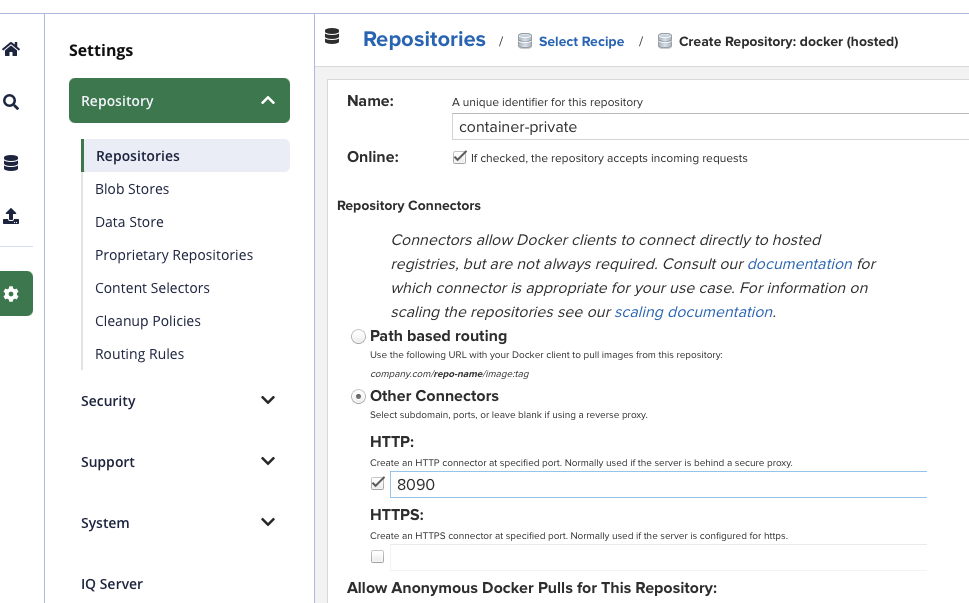
Then I setup a service to forward to that repo.
kind: Service
apiVersion: v1
metadata:
  name: nexus3-container-registry
  namespace: nexus-m88i
spec:
  ports:
    - name: http
      protocol: TCP
      port: 8090
      targetPort: 8090
  type: ClusterIP
  selector:
    app: nexus3
And then a route:
kind: Route
apiVersion: route.openshift.io/v1
metadata:
  name: container-private
  namespace: nexus-m88i
spec:
  host: container-private-nexus-m88i.apps.okd.example.com
  to:
    kind: Service
    name: nexus3-container-registry
    weight: 100
  port:
    targetPort: http
  tls:
    termination: edge
    insecureEdgeTerminationPolicy: Redirect
  wildcardPolicy: None
And I was able to upload:
➜  nexus git:(main) ✗ podman login https://container-private-nexus-m88i.apps.okd.example.com
Authenticating with existing credentials for container-private-nexus-m88i.apps.okd.example.com
Existing credentials are valid. Already logged in to container-private-nexus-m88i.apps.okd.example.com
➜  nexus git:(main) ✗ podman push container-private-nexus-m88i.apps.okd.example.com/myapp:latest
Getting image source signatures
Copying blob sha256:1938ce78c48a7c4e5206ee554d2bd28f24e6cc86c38c6d699efda01f54e6aadb
Copying blob sha256:d50c1c176b95153f124095339614f2823e64fb970d2dc142e9a0ece5c72051cb
Copying config sha256:3a8e43bd00b2f3ee1731f64cbbf0832b2bd17439ac4b98b95d794fd3da0ea333
Writing manifest to image destination
Yay?